A hotel doesn’t charge your card when you book — it authorizes it, and captures the money when you actually check out. Cancel the reservation, and the pending amount simply fades away: no charge, no refund, no fee, no dispute. That two-step is available to any Stripe seller, and for some business models it’s the difference between a chargeback and a calm Tuesday.
In this guide, I’ll explain what a card hold (pre-authorization) really is and what it guarantees, how long the authorization windows actually last by network, which business models should use authorize-then-capture instead of charging immediately, and what it takes to run this flow from a WordPress site — honestly, including the parts that need more than a plugin setting. Sourced from Stripe’s capture-later documentation throughout.
What a hold actually is
When you create a payment, you can place a hold on an eligible payment method instead of charging it immediately — “reserve funds that you can capture later,” as Stripe’s documentation puts it. Authorizing guarantees the amount by holding it on the customer’s payment method: the money is earmarked for you, but it hasn’t moved. Usually nothing appears as a settled charge on the customer’s statement yet — though Stripe notes that some issuers don’t clearly distinguish authorizations from captured payments, which can confuse customers either way.
That distinction matters more than it sounds. A hold is not money in your account — it’s a promise with an expiry date. Capture before the expiry and the promise converts to a real charge. Let it expire and the funds are released back to the customer and the payment status flips to canceled — no charge ever existed, nothing to refund, nothing to dispute. If you’re working with the API, the capture_before attribute on the charge tells you exactly when that happens.
The windows: how long you actually have
The headline number is up to 7 days for online card payments — but treat it as a ceiling, not a guarantee, because the exact window depends on the card network and the transaction type. Per Stripe’s authorization-validity table:
| Card network | Authorization window (online) |
|---|
| Visa | 5–7 days (varies by transaction classification) |
| Mastercard | 7 days |
| American Express | 7 days |
| Discover | 7 days |
Three footnotes that change real-world behavior. In-person Terminal payments get a much shorter window — typically 2 days. Some eligible payments can request an extended authorization for a longer validity period. And merchants based in Japan can hold JPY-denominated transactions for up to 30 days. The planning rule: build your flow around the number you can see (capture_before on the actual charge), never around the number you remember from a table — including this one.
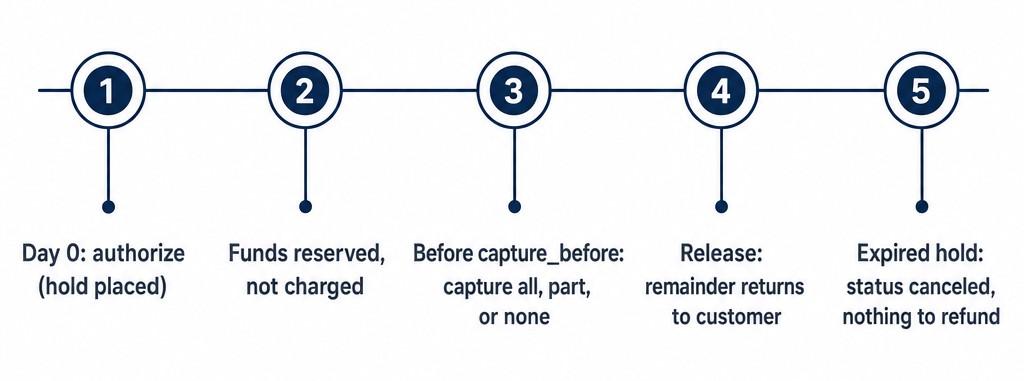 The life of a hold: authorize, funds reserved, capture before the deadline, release, or expire
One wrinkle: who the bank thinks is in the room
The window your hold gets can also depend on how the transaction is classified. Stripe and the card networks sort payments into customer-initiated (CIT) and merchant-initiated (MIT) buckets — and they do it “based on signals of cardholder participation, not solely on API parameters.” The practical translation from the docs: a payment you marked as off-session can still be classified as customer-initiated if a CVC was present, and it then gets the CIT authorization window instead. The safe habit for any flow that touches saved cards: read the expiry on the actual charge (capture_before) rather than assuming which bucket you landed in.
When pre-auth beats charging immediately
Four business models where authorize-then-capture isn’t a nicety but the correct default:
- Services with a variable final bill. Quotes that change with the job — repairs, catering, freight, consulting days. Authorize the estimate, capture the actual. No refund dance when the bill moves, and remember from our refunds guide that refunds burn the original processing fee.
- Rentals and deposits. Equipment, venues, vehicles: hold the deposit as insurance, release it by simply never capturing (or capture partially for the broken lamp). An expired hold costs everyone nothing; a refunded damage deposit costs you fees and them days.
- Stock-checked orders. Authorize at checkout, capture when the warehouse confirms. A canceled authorization instead of an out-of-stock refund keeps the fee, the customer relationship, and your dispute rate all intact — the customer sees a pending amount disappear, which reads as “never charged” rather than “charged and refunded.”
- A manual review window. High-value or high-fraud-pattern orders get a human glance before the money moves — fraud screening with time to think, instead of refund-after-the-fact. As our disputes guide notes, a suspicious payment you simply never capture never becomes a dispute statistic either.
And when not to bother: instant-delivery digital goods, simple fixed-price products, donations. If fulfillment is immediate and the amount never changes, a hold is just a second step that can expire on you — plus a confused customer asking why their card shows a pending amount “but no charge” for a download they already have. Save the mechanic for the cases where it earns its keep.
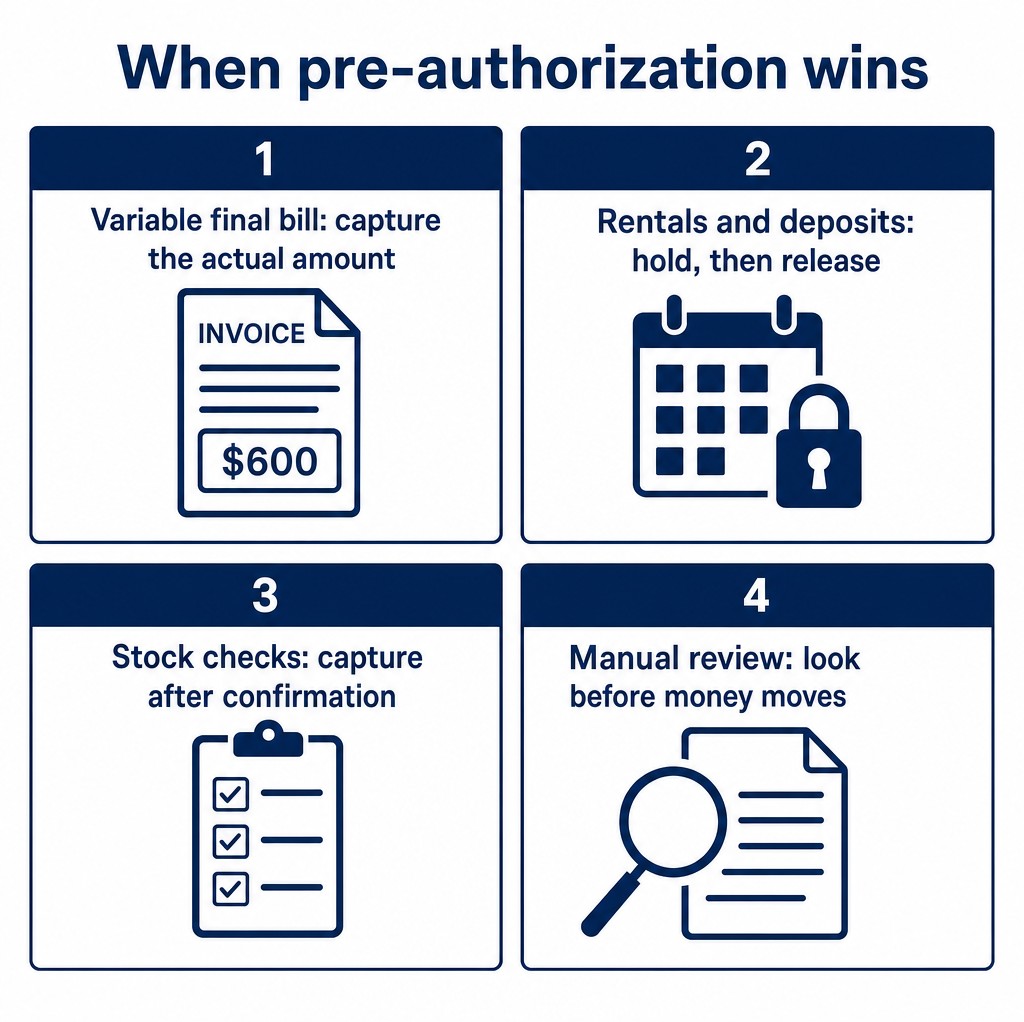 When pre-authorization wins: variable final bills, rentals and deposits, stock checks, manual review
A week in the life of a $600 hold
Make it concrete. You rent camera gear, and a customer books a $600 kit for next weekend:
- Day 0 (booking): you authorize $600. The customer sees a pending reservation on their card, not a charge. Your Stripe Dashboard shows an uncaptured payment with its
capture_before date.
- Day 2 (pickup): gear goes out in good order. You do nothing yet — the hold sits.
- Day 5 (return): kit comes back missing a $90 battery. You capture $90 (which costs you 2.9% + 30¢ = $2.91, like any charge) and let the remaining $510 release on its own. The customer is charged exactly $90; no refund, no fee eaten on $600, no dispute over a full deposit chargeback.
- The counterfactual: had you charged $600 on day 0 and refunded $510 on day 5, you’d have paid processing on the full $600 (2.9% + 30¢ = $17.70, gone for good) and the customer would have watched a $600 charge sit on their statement for days. Same business outcome, $14.79 and one annoyed customer apart.
That counterfactual is the whole argument for the mechanic in one paragraph: holds make “maybe-charge” scenarios cheap — completely free when nothing is captured at all — while charge-then-refund makes them expensive.
What it takes on a WordPress site
Here’s the honest part, so no one promises this to a client before checking their tools. Manual capture is a server-side Stripe capability: the payment is created with manual capture intent (in API terms, capture_method: manual on the PaymentIntent), and the capture itself is a second explicit call later — from your server, a dashboard, or an automation. Whether you can run it from WordPress depends entirely on what your payment layer exposes:
- Plugin-provided route. WP Full Pay’s deposits documentation has listed an authorize-capture route among its options (full disclosure: it’s our plugin) — we couldn’t re-verify that docs page as of this writing, so check the current docs and your license before promising this flow to anyone, including yourself.
- Custom-code route. A developer can build the two-step directly on Stripe’s APIs: create with manual capture at checkout, then capture from wp-admin tooling, a cron job, or the Stripe Dashboard after fulfillment. This is the guaranteed-available path, at the cost of actual code — and it’s the right answer when holds are your core flow rather than an occasional tool.
- Dashboard-assisted route. Even without plugin support, an integration that creates uncaptured payments can be captured manually in the Stripe Dashboard — clunky at volume, perfectly fine for the occasional big invoice or a twice-a-year equipment rental.
Operations: somebody has to own the open holds
One operational warning before you fall in love with the mechanic: every open hold is a ticking task, and it needs an owner. At five holds a month, a shared calendar reminder per booking works. At fifty, you need the uncaptured-payments list in your Stripe Dashboard checked on a schedule — or an automation (a cron job, a workflow tool) that captures or flags holds approaching their capture_before date. The failure mode to avoid is the quiet one: holds that nobody captures and nobody notices until the customer asks why the reservation vanished. If your team can’t name who checks open holds on Fridays, you’re not ready to run this at volume — start with the dashboard-list habit and scale the plumbing later.
The honest limits
Three failure modes to design around. First, expiry is silent: if fulfillment slips past capture_before, the hold evaporates and you’re asking the customer to pay again — put a calendar reminder or an automation on every open hold, with slack for the Visa window’s shorter variants. Second, capture amounts have rules: capturing less than the hold is generally fine (the rest releases), but capturing more than authorized is restricted to certain online card payments (Stripe’s overcapture option) — authorize for the realistic ceiling, not the floor. Third, support varies by payment method: holds are fundamentally a card mechanism, though several wallet and BNPL methods (Klarna, Afterpay, Cash App Pay, PayPal, Affirm) also support separate authorization and capture with their own windows — while bank-debit methods generally don’t offer manual capture. Check per method before designing a flow around it, and keep the immediate-charge path for the methods that don’t.
Bottom line
Authorize-then-capture turns “charge now, refund later” into “promise now, decide later” — and since refunds always cost you the original processing fee, every hold you simply let expire is money kept. Use it where the final amount or fulfillment is uncertain, build around the visible expiry date instead of the 7-day ceiling, and verify your WordPress tooling actually exposes manual capture before you design the sales page. Done right, it’s an underused fee-saving and dispute-avoiding mechanic — and done casually, it’s a quiet source of expired holds and second-chance payment requests. The difference is entirely in the operational habits a couple of sections up.
Sources