A customer emails: “Can I get my money back?” It’s a Tuesday, the order was $89, and you remember packing it yourself. Your finger hovers over the refund button. Before you click it, there’s one fact every Stripe seller should know cold — because it changes how you think about refunds, pricing, and even your cancellation policy.
In this guide, I’ll cover what a refund really costs (it’s not zero, and it’s not the Stripe fee structure you’d expect), the right way to issue full and partial refunds, the edge cases that bite merchants — reversals, failed refunds, and the bank-debit double-refund trap — and how a visible refund policy actually saves you money. Sourced from Stripe’s refund documentation throughout.
The fee fact nobody tells you upfront
Here it is, verbatim from Stripe’s refunds documentation: “Stripe’s processing fees from the original transaction aren’t returned.”
Read that twice if you sell anything with thin margins. When you refund a $100 sale, the customer gets $100 back — but the $3.20 you paid in processing (2.9% + 30¢ on domestic cards) is gone forever. The refund costs you $3.20, not $0. On a $1,000 order, that consumed fee is $29.30. Refunds are never free; they’re just cheaper than the alternative most of the time — and the alternatives are nearly always worse than that.
Put concrete numbers on it at the sizes most WordPress sellers actually see:
| Original sale (domestic cards, 2.9% + 30¢) | Customer gets back | Processing fee you keep paying |
|---|
| $10.00 | $10.00 | $0.59 |
| $100.00 | $100.00 | $3.20 |
| $1,000.00 | $1,000.00 | $29.30 |
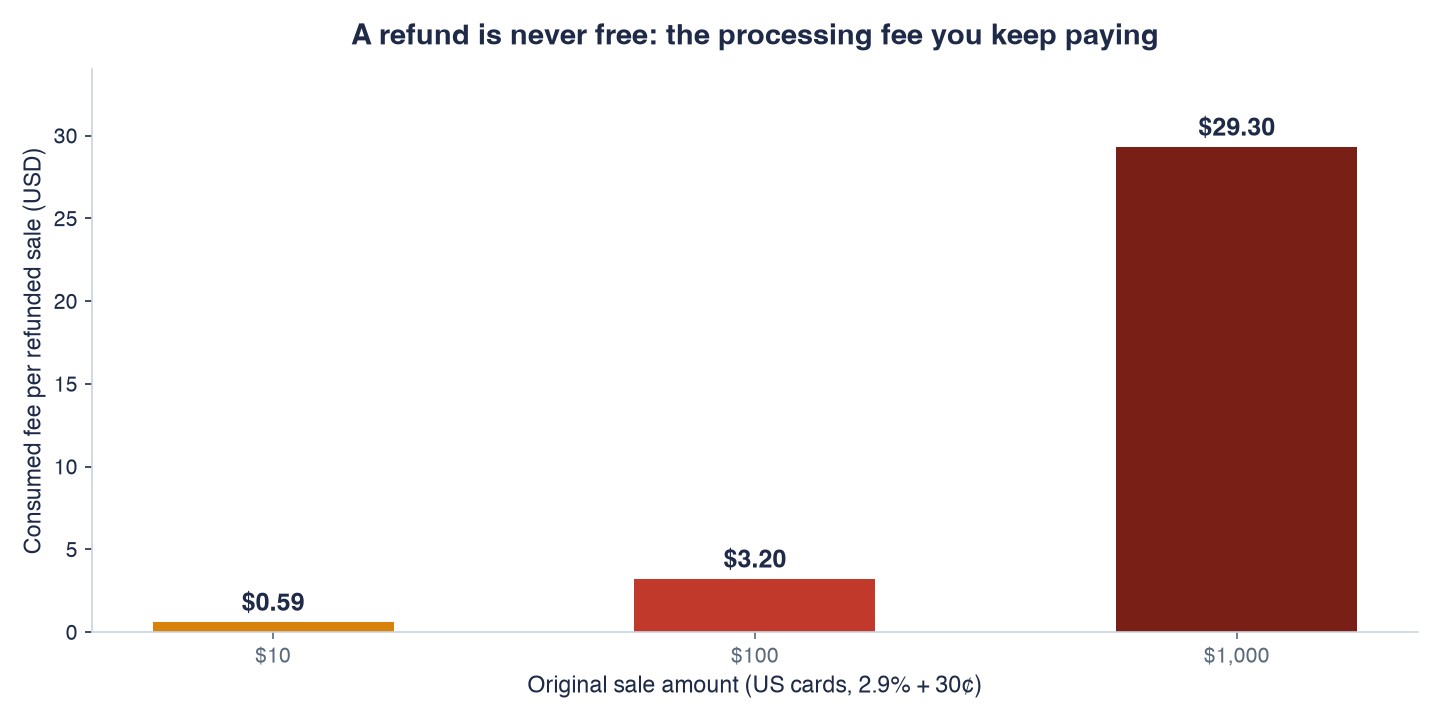 A refund is never free: the consumed processing fee on refunded sales of $10, $100, and $1,000
And here’s the margin framing that should shape your policy: on a 20% profit margin, that consumed fee on a refunded $100 sale equals 16% of the profit you made on an identical kept sale. Refund one in six of your orders and the fee drag is material; refund one in fifty and it’s noise. Know your rate before you agonize over your policy.
The first free exit is time-locked: you can cancel a payment before it completes at no cost. If a customer emails you thirty seconds after checkout (“wrong size!”), and the payment hasn’t completed yet, cancel it instead of refunding — no processing fee was ever locked in. The honest caveat: with a standard automatic-capture integration, charges complete in seconds, so this window exists only for payments still uncaptured (manual-capture flows, or bank debits that haven’t posted yet); for everything else you’re already in refund territory. That’s why fast support responses literally pay: an hour of lag is the difference between a free cancel and a fee-consumed refund. If your support queue runs on a 24-hour SLA, every “cancel” request you answer is already a refund — you just haven’t noticed the fee leaving yet.
Refund vs dispute: pick the refund, almost always
A quick framing line, because the two get confused constantly: a refund is you returning money voluntarily; a dispute (chargeback) is the customer’s bank pulling it back involuntarily, with $15+ in fees and an evidence fight attached. We have a whole disputes playbook for the second scenario. The short version of the comparison: even at $3.20 in consumed processing fees, a refund is dramatically cheaper than a dispute you’d win, and infinitely cheaper than one you’d lose. When a customer is unhappy, making the refund easy is the financially rational move — which is why your policy belongs on the checkout page, not in a footer.
How to actually issue the refund
The mechanics, per the documentation: find the payment in your Stripe Dashboard, click refund, and choose the amount — full by default, or enter a different figure for a partial refund. Two operational details worth knowing:
- Partial refunds are one-at-a-time. The Dashboard supports bulk refunding of full payments (check the boxes, refund with a reason), but partials must be issued individually. If you run a “keep 20% as a booking fee” policy, budget the manual minutes accordingly.
- Multiple partials stack. If a payment has several partial refunds over time, track each one by its own refund record rather than just the original charge — useful for staged cancellations, and essential for clean bookkeeping.
On the customer’s side, the refund isn’t always instant — some networks and banks post refunds in real time, others take longer, and you don’t control the window. Tell them that in the confirmation email, with the exact amount and the refund reference. Most “where’s my refund” follow-ups (and a slice of would-be disputes) die right there. The rest die when you can paste that reference into your reply instead of saying “it’s processing” — so keep the confirmation, not just the click.
Subscription sellers: canceling isn’t refunding
If you sell recurring plans, keep two actions separate in your head (and in your support macros). Canceling stops future renewals — it says nothing about money already collected. Refunding returns a past charge — it says nothing about future ones. A customer asking to “cancel and get my money back” needs both, explicitly: the cancellation so next month’s charge never fires, and the refund on the charge they’re disputing. Do only one and you’ve created tomorrow’s ticket — either an unexpected renewal charge (refunded but never canceled) or a revoked access with money still taken (canceled but never refunded). This is also where the disputes playbook’s advice applies double: many subscription chargebacks start as exactly this half-finished support exchange.
Edge cases that bite merchants
Reversal vs refund — the good kind of nothing. Refund very soon after the original charge and the customer may see a reversal instead: the pending charge simply drops off their statement as if it never existed. Per the docs, Stripe doesn’t withhold any fees for payment reversals — the charge never completed its lifecycle, so there’s no consumed processing fee. This is the second free exit, and it’s another reason same-day customer service pays for itself.
Failed refunds. Sometimes the money can’t go back: a closed bank account, an expired card, a bank that can’t process the credit. When that happens, the bank returns the amount to Stripe and it’s added back to your balance — a process that “can take up to 30 days.” The customer still needs their money through some other channel (a check, a different card), so a failed refund is a support conversation, not a closed ticket. Watch for them instead of assuming every click landed.
The bank-debit double-refund trap. This one costs real money. If you take ACH or other bank debits and you proactively refund a customer while their bank also initiates a dispute on the same transaction, the customer can receive two credits for one payment — and pulling one of them back is a world of pain. The docs warn about it explicitly for SEPA, ACH, Bacs, ACSS, BECS and NZ debits. The rule: on bank-debit payments, check for an existing dispute before issuing a proactive refund, and if one’s already open, work the dispute instead of refunding. The refunds doc flags a related status (charge_for_pending_refund_disputed) — a dispute landing while your refund is still pending — with the same advice: respond to the dispute, don’t double-pay.
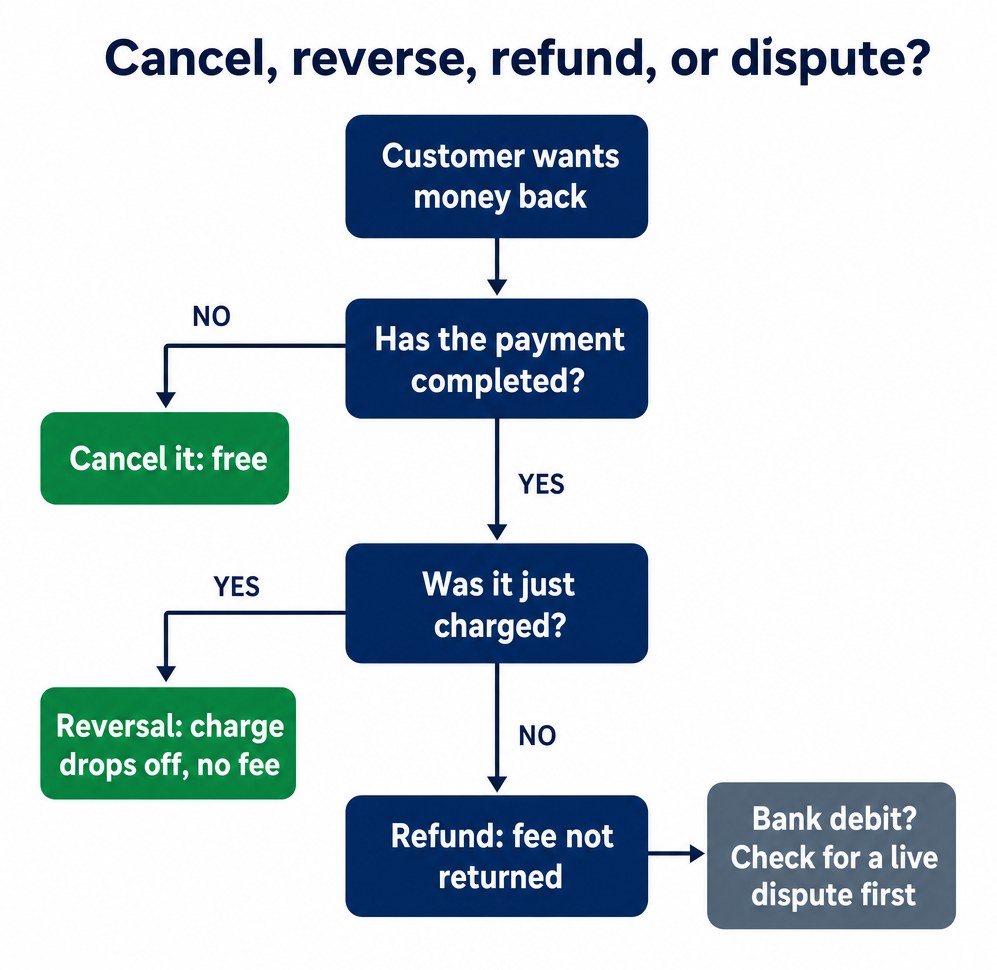 Cancel, reverse, refund, or dispute: the decision flow when a customer wants money back
The other side: when not to refund
Everything above said “refund fast” — and it’s right in the overwhelming majority of cases. The small remainder is refund abuse, and it has patterns worth a second look before you click: repeat refunders across multiple orders, digital goods downloaded and then “never received,” annual plans refunded on day 29 of a 30-day policy every year. This is where the visible policy earns its keep in reverse: a clear, consistent policy with dated terms is what lets you say no fairly — and the access logs, download records, and delivery confirmations you keep for disputes are the same records that tell you which refund requests are genuine.
The decision rule: refund fast when the claim is plausible, investigate when the pattern repeats. A customer with a problem deserves your easiest process; a pattern deserves your evidence folder. Confusing the two — generosity to abusers, friction to genuine customers — is the most expensive habit a small shop can have.
Designing a refund policy that saves money
Everything above argues for a policy that’s generous, visible, and fast — and that’s not softness, it’s arithmetic:
- Visible beats generous. State the policy on the checkout page itself (window, conditions, how to ask) — one honest sentence outperforms a legal page nobody reads. Customers who know the exit exists rarely force the expensive one — and as our disputes guide notes, shown policies double as evidence later.
- Fast beats free. Same-day responses catch the two free exits (cancel-before-completion, reversal) before they expire into consumed-fee refunds — track your average first-response time like it’s a fee metric, because it is.
- Partial beats binary. For services and bookings, a staged policy (full within 7 days, 50% within 30) keeps some revenue while staying fair — just remember partials are manual clicks each.
- Bank debits get a pause button, not a hair trigger. Verify no dispute exists first, every single time — the double-credit trap above is the one mistake in this whole guide that you can’t undo with an apology.
Bottom line
Refunds cost you the original processing fee — that’s the headline, and it makes same-day cancellation and reversals the only truly free exits. Use partial refunds for staged policies, watch for the 30-day failed-refund boomerang, and never proactively refund a bank debit without checking for a live dispute first. And put the policy where people can see it: the cheapest refund is the one that never had to become a dispute. Full disclosure: WP Full Pay is our plugin — and the refunds in this guide happen in your Stripe Dashboard, which is where these habits pay off regardless of how you sell.
Sources