The email arrives at 7:12 in the morning: “A dispute has been opened against one of your payments.” If you sell anything through Stripe — products, services, donations, subscriptions — you’ll get one eventually. The clock starts the moment that email lands, and what you do in the first hours matters more than most merchants realize.
In this guide, I’ll walk through the whole lifecycle from the merchant’s side: how the money actually moves, what a dispute really costs (it’s more than the amount), which evidence wins by category, and the handful of prevention habits that genuinely move the number. Everything is sourced from Stripe’s own dispute documentation, linked throughout.
What happens the moment a customer disputes
A dispute isn’t one event — it’s two phases, and confusing them costs merchants money.
Phase 1: the inquiry (sometimes called an early fraud warning). The cardholder’s bank asks for clarification, often because the customer simply doesn’t recognize the charge on their statement. This is your best moment: per Stripe’s dispute documentation, you can resolve an inquiry without incurring a dispute fee — either by refunding or by giving the customer enough information to recognize the purchase. A fast, human reply here (“Hi — that’s the invoice for the annual plan you started on March 3rd”) kills a surprising share of disputes before they exist.
Phase 2: the chargeback. If the inquiry doesn’t resolve it, the card network pulls the money: Stripe debits the disputed amount plus a dispute fee from your balance, and the clock starts on your response window. Stripe’s own analysis adds a useful heuristic for early fraud warnings: refunding is roughly break-even when the charge is small relative to your dispute fee, and it’s “likely not worthwhile to refund EFWs on charges more than 35 percent higher than your dispute fee.” In other words — big charge, fight; tiny charge, refund and move on.
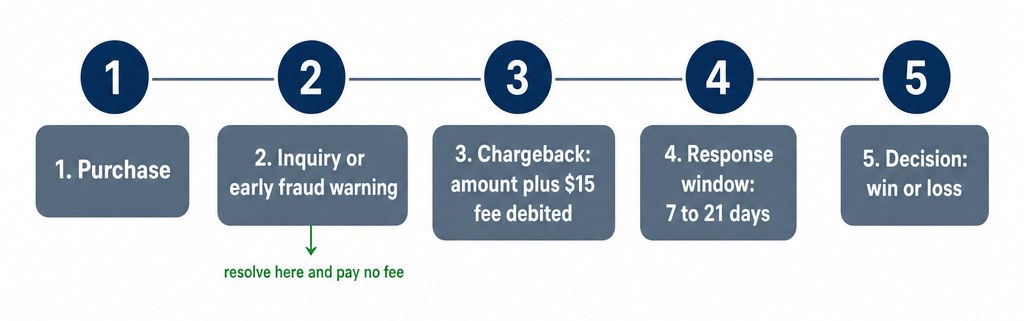 The dispute lifecycle: purchase, pre-dispute signal, chargeback, response window, decision
The real cost of a dispute
Merchants count the disputed amount and stop there. The fee stack is worse. Per Stripe’s US pricing:
- Dispute received fee: $15.00 — charged for every dispute you receive, win or lose (in rare cases, network fees also apply).
- Dispute countered fee: $15.00 — charged when you respond manually; refunded if you win, kept if you lose.
- Smart Disputes: 30% of the disputed amount — Stripe’s AI-assembled evidence option, charged only on disputes you win (no fee for lost ones, though the $15 received fee still applies). Worth knowing about for high-volume shops, overkill for a three-disputes-a-year one.
Run the arithmetic on a $50 charge:
| Your move | Money outcome | Time cost |
|---|
| Refund during inquiry | −$50, no fees | 2 minutes |
| Ignore the chargeback | −$50 − $15 = −$65 | 0 minutes (and you lose) |
| Fight and win | −$15 (received fee; countered fee refunded) | 30–60 minutes |
| Fight and lose | −$50 − $15 − $15 = −$80 | 30–60 minutes |
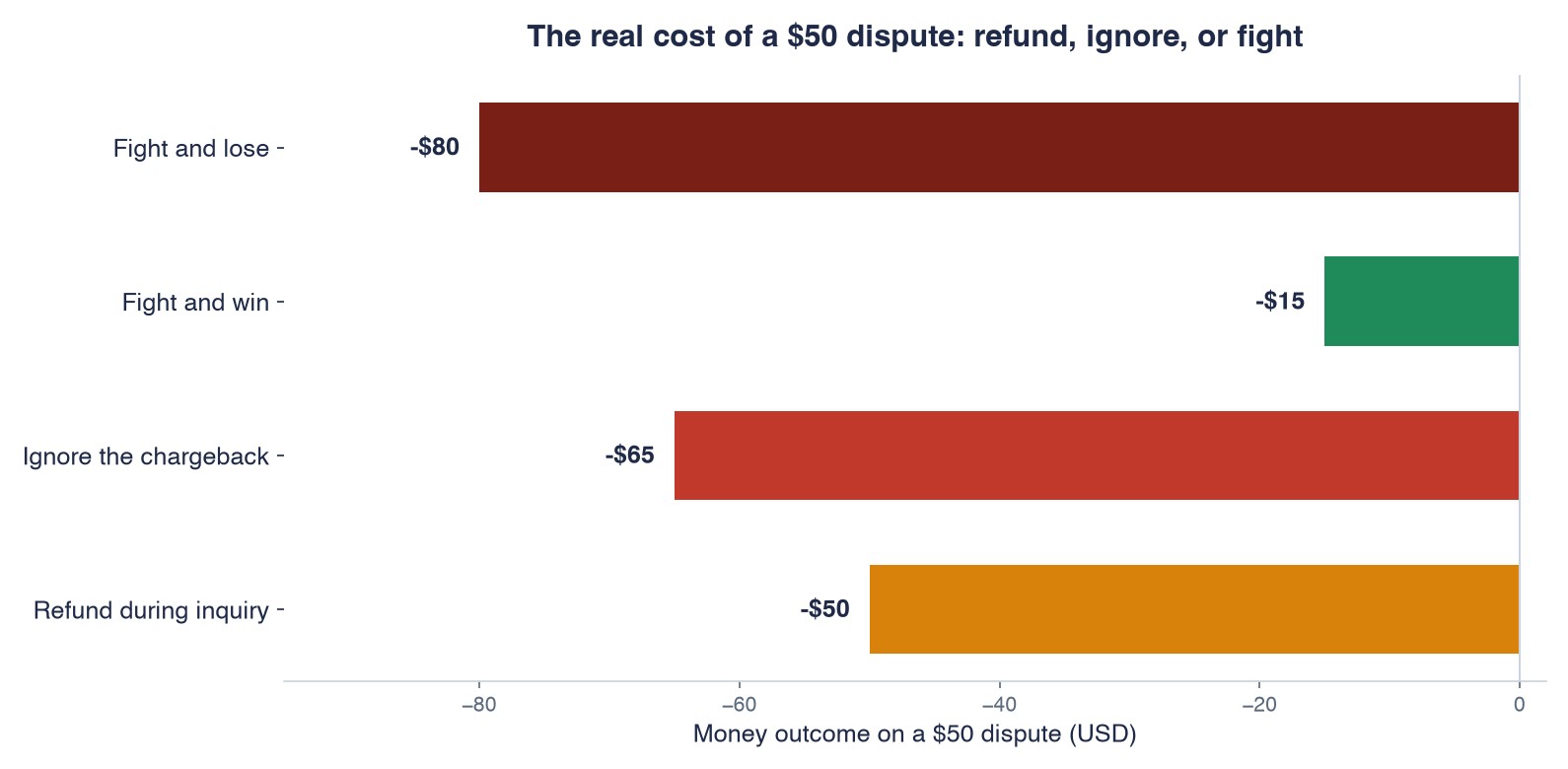 The real cost of a $50 dispute: refund during inquiry, ignore, fight and win, or fight and lose
Two conclusions fall out of that table. First, the enemy is the guaranteed loss, and it comes in two flavors: ignoring a dispute (the disputed amount and the non-refundable $15 received fee are both guaranteed gone, and winning stops being possible) and fighting a case you can’t evidence — the table’s −$80 row, the only outcome worse than ignoring. Second, the break-even on fighting depends on the amount and your evidence, not your mood. For a $10 ebook with weak evidence, refund. For a $500 service with a signed agreement, fight every time.
The first hour: a checklist
When the dispute email lands, resist the urge to start writing a defense immediately. Work this order instead:
- Open the dispute in your Stripe dashboard and read the category first. “Fraudulent” and “product not received” need completely different evidence, and the category tells you which game you’re playing.
- Check for a Compelling Evidence flag. For Visa fraud disputes, look for the CE 3.0 eligibility notice — if it’s there, your odds just jumped, and Stripe has most of the evidence already.
- Put the response deadline in your calendar with a reminder two days early. Everything else is optional; this one isn’t.
- Decide: refund or fight. Use the math table above, not your feelings about the customer.
- If you fight, email the customer before you submit anything. Some disputes end right there, and the thread becomes evidence either way.
Fifteen minutes, in that order, and you’re ahead of most merchants the dispute system processes that day.
The response window is shorter than you think
Once a chargeback exists, you have usually 7 to 21 days to respond, depending on the card network — and if you miss the deadline, “you automatically lose the dispute and can’t retrieve the disputed funds.” That’s from Stripe’s response guide, and it’s the single most expensive sentence in dispute management. Put the deadline in your calendar the day the dispute email lands, not the day you get around to it.
One more reason to respond even when the case looks weak: you might be stronger than you know. For Visa fraud disputes (reason code 10.4), Stripe automatically evaluates your transaction history for Visa Compelling Evidence 3.0 eligibility and flags it in the dashboard — and that eligibility “typically translates to a significantly higher likelihood of overturning the dispute in your favor.” If you don’t open the dispute page, you never see the flag.
Evidence that wins, by category
The card networks define hundreds of dispute reason codes; Stripe organizes them into eight categories — duplicate, fraudulent, subscription canceled, product not received, product unacceptable, unrecognized, credit not processed, and general. Each category has its own evidence playbook, and generic evidence loses to specific evidence:
- Fraudulent / unrecognized. If the payment was authenticated with 3D Secure, liability for fraud disputes normally shifts to the issuer — and Stripe automatically submits most of the evidence (the ECI value from the authentication) for you. This is the quiet superpower of 3DS, and it only works if the payment was actually authenticated.
- Product not received. Delivery confirmation wins — but note Stripe’s warning: card issuers don’t follow links, so a tracking URL is worthless. Screenshot the tracking page showing the delivered status and the address.
- Subscription canceled. Your cancellation policy as shown at checkout, the timestamped agreement, and usage logs proving the customer kept using the service after the date they claim they canceled.
- Credit not processed. The refund receipt and its reference — if you already refunded, the dispute is a paperwork error, and the fix is showing the paper.
Two habits multiply the value of everything above. Contact the customer before you submit — Stripe’s own guide recommends it, and the conversation both resolves some disputes outright and becomes evidence itself. And keep every email: your response is a story told with documents, and the merchants who lose are usually the ones whose story has holes.
When disputes become a pattern: monitoring programs
One dispute is a nuisance. A rising dispute rate is an existential problem, and it escalates on the networks’ schedule, not yours. Per Stripe’s monitoring-programs documentation, every card network obligates you to keep disputes and fraud under its thresholds; cross them and you’re placed into a monitoring program with monthly fines and extra fees until your numbers come back down in a sustained way. Fail to fix it in the program’s time window and the network can refuse to process your payments at all — which, for an online business, is the game-over screen.
Two things worth knowing before you panic. Monitoring programs are comparatively rare — they’re aimed at sellers with sustained high dispute rates, not a bad week. And one nuance on refunds: monitoring programs count disputes whether or not you refunded afterward — a refund doesn’t erase the mark. The refund that protects your standing is the early one, during the inquiry phase, before a chargeback exists at all. Prevention beats remediation here too. If you ever are placed in a program, Stripe can work with you on a remediation plan and relays your progress to the network monthly — answer those emails promptly.
Prevention that actually moves the number
The cheapest dispute is the one that never opens. From Stripe’s prevention best practices, the few that matter most for WordPress sellers:
- Fix your statement descriptor. Many “fraudulent” disputes start life as a charge the customer simply doesn’t recognize. Descriptors are limited to 5–22 characters, need at least 5 letters, and can’t contain
< > ' " — use your website domain or business name so the charge rings a bell on the statement. Set it in your Stripe account’s public business information, and use a separate Stripe account (and descriptor) per business you run.
- Show your policies before the payment. Refund, cancellation, and delivery terms on the checkout page itself — not buried in a footer link — both prevent disputes and become evidence later.
- Ship with tracking and delivery confirmation, and send it to the customer immediately.
- Layer in fraud tooling for the front end. We’ve covered Stripe Radar and card testing attacks separately; those posts cover stopping bad payments before they happen, which is upstream of everything here.
Rehearse it in test mode
You can walk the entire flow without real money using Stripe’s test cards: charge 4000000000000259 in test mode and the payment succeeds, then gets disputed as fraudulent (this type is protected after 3D Secure authentication); 4000000000002685 produces a “product not received” dispute that 3DS does not protect. Ten minutes of clicking through the test dispute in your dashboard — seeing where the deadline shows, where evidence uploads live — is worth more than reading any guide, this one included.
Bottom line
Disputes are a process, not a verdict. Answer inquiries within the hour (it’s the only phase that’s free), calendar the response deadline the day a chargeback lands, match your evidence to the category, and fix the descriptor that made the customer suspicious in the first place. Full disclosure: WP Full Pay is our plugin — but nothing in this playbook requires it; every step happens in your Stripe dashboard and your WordPress admin, which is exactly where it should be.
Sources