A customer in France tries to pay you and gets an authenticate-your-purchase step they’ve never seen before. Another gets their card declined with a cryptic code. A third sails through without noticing anything. If you sell through Stripe forms, all three are the same machinery working as designed — and once you understand it, none of it is scary.
In this guide, I’ll unpack what 3D Secure 2 and Strong Customer Authentication actually do on a WordPress Stripe form in 2026: who has to care (geography decides more than anything), what triggers the extra step, which transactions get to skip it, what you get in exchange for the friction, and exactly how to test the whole thing before your customers do. Everything is sourced from Stripe’s documentation, linked as we go.
What 3D Secure 2 actually is
3D Secure is an authentication layer: during checkout, the customer’s bank verifies that the person typing the card number is the person who owns it — usually with a push notification, a banking-app confirmation, or an SMS code. Per Stripe’s authentication-flow documentation, Stripe runs 3D Secure 2 whenever the customer’s bank supports it and falls back to 3D Secure 1 otherwise. You don’t choose the version; the bank does.
The “2” matters more than it looks. 3DS2 sends the bank far more context about the transaction — device, history, behavior — which enables the frictionless flow: the bank decides the risk is negligible and authenticates silently, with no customer action at all. Stripe’s optimized 3DS server can even complete authentication while confirming the PaymentIntent, so the customer never knows anything happened. It feeds the bank whatever context it can legitimately infer — data from the current checkout, the customer’s past transactions with you, signals from the card itself — specifically to keep as many payments as possible on the frictionless path. Only when the bank wants more proof does the visible challenge flow appear. When people say “3DS killed my conversion,” they’re describing the challenge flow; the frictionless version passes unnoticed by design.
Who actually has to care: the geography test
Here’s the scoping fact most guides bury: Strong Customer Authentication is a European rule. It’s part of the PSD2 regulation, in effect since September 14, 2019, and per Stripe’s SCA guide it applies when your business is based in the European Economic Area (or you process for EEA-based connected accounts), with the UK running its equivalent regime. Within that scope, card payments require 3D Secure to comply, and banks are expected to decline transactions that skip it.
Outside Europe — a US shop selling to US customers, say — SCA doesn’t bind you, and 3D Secure becomes a choice rather than a mandate. But it’s a choice with a real prize attached, which we’ll get to: the liability shift. European sellers get the compliance requirement and the prize; everyone else should read the prize section and then decide.
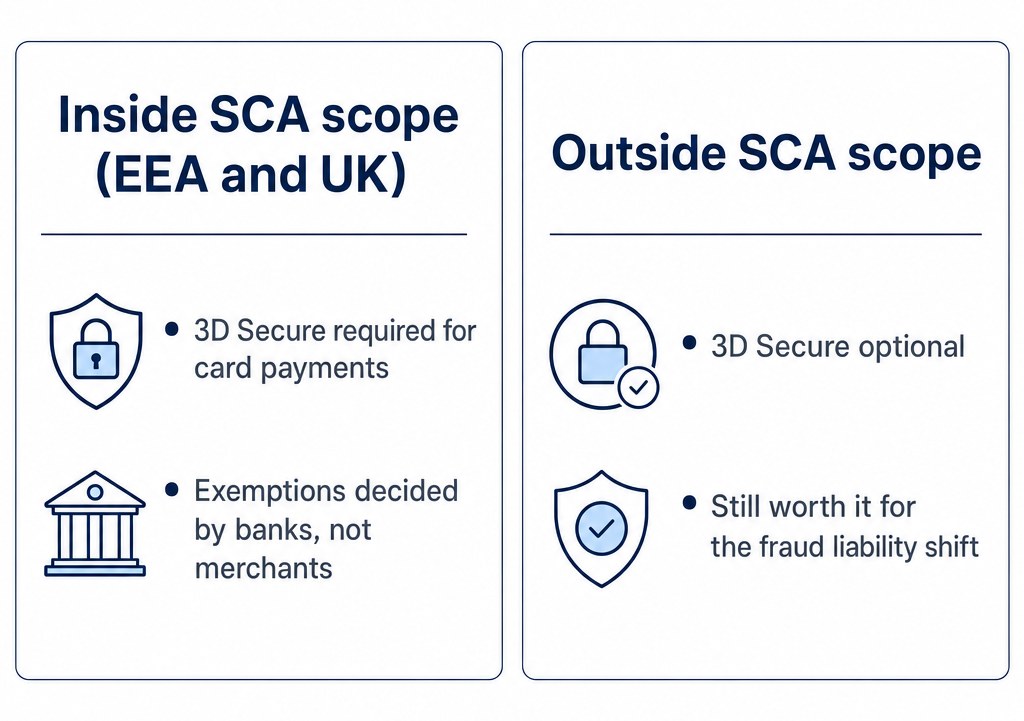 Inside vs outside SCA scope: the EEA and UK require 3D Secure with bank-decided exemptions; elsewhere it is optional but still valuable
What triggers authentication on a Stripe form
3DS isn’t an on/off switch you control per transaction. Per Stripe’s docs, it’s requested based on a combination of:
- Regulatory mandates — the SCA requirement above, applied automatically to in-scope payments.
- Radar rules — Stripe’s fraud tooling can request 3DS on transactions that match your risk rules (including Adaptive 3DS, which applies it selectively).
- Manual API requests — an integration can explicitly ask for 3DS on a given payment.
- Issuer soft declines — the bank refuses the charge with a code that effectively means come back with authentication, and Stripe automatically retries with 3DS. That’s the decline your customer saw; it’s a feature, not a bug.
Two honest caveats from the same documentation. First, not every transaction can run 3DS — some wallets and off-session payments don’t support it, and the PaymentIntent just proceeds without it. Second, for off-session payments (think subscription renewals), the customer isn’t present to approve anything, which is exactly what the exemption system below exists for.
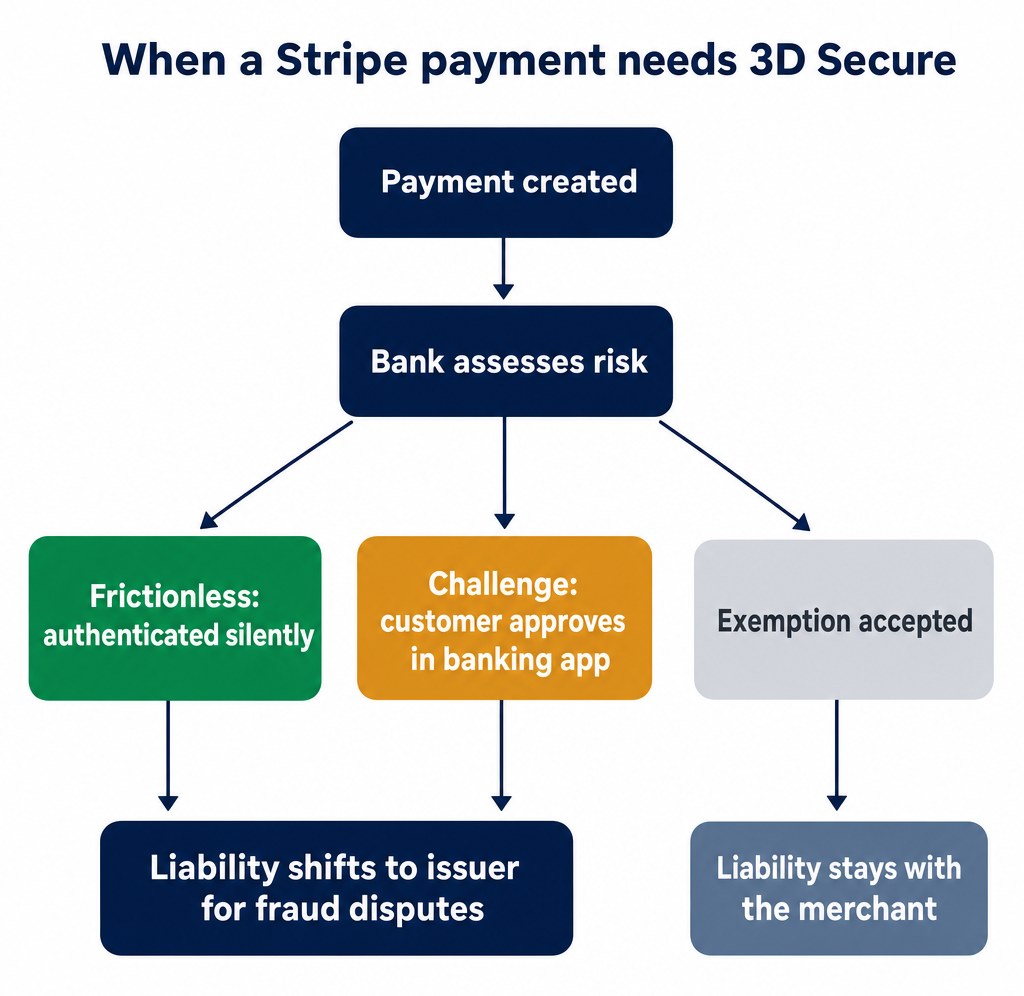 The 3D Secure flow on Stripe: frictionless, challenge, and exemption paths, and where fraud liability lands
The exemptions: when authentication usually isn’t required
Even inside SCA territory, plenty of payments legitimately skip authentication. Per Stripe’s SCA guide, the ones that matter for online sellers:
- Transaction Risk Analysis (TRA). If your payment provider’s overall card fraud rate stays under set thresholds, transactions can be exempted up to size limits: a fraud rate at or under 0.13% covers transactions below €100/£85, 0.06% covers below €250/£220, and 0.01% covers below €500/£440. Stripe performs this risk analysis in real time, and its guide calls it “one of the most useful exemptions for businesses and one of the most widely supported by banks.”
- Low-value payments. Transactions under €30/£25 can be exempt — but banks must start enforcing after the exemption has been used five times since the customer’s last successful authentication, or once exempted payments total €100/£85. Small isn’t automatically exempt; it’s exempt until the bank’s counter fills up.
- Merchant-initiated transactions (MIT). Off-session charges you initiate — subscription renewals on a saved card — are out of SCA’s scope entirely, provided the original setup was properly authenticated. Out of legal scope, that is — a bank can still request a challenge on an individual charge, which is the scenario two sections down. This is why the first payment in a subscription matters so much.
Two cautions worth bolding. Exemptions are requests, not rights: the customer’s bank decides whether to honor one, and Stripe’s own docs stress that “exemptions aren’t guaranteed.” And there’s a trade: when an exemption is applied, liability for fraudulent disputes stays with you, the merchant. An exemption is free only until the fraud claim arrives — which brings us to the other side of the ledger.
What happens when a renewal needs authentication anyway
Here’s the scenario subscription owners actually hit: the first charge authenticated properly, renewals run as merchant-initiated transactions — and then one bank, on one renewal, decides it wants the customer anyway. The off-session charge fails, because nobody is present to answer a challenge at 3 a.m. This is normal, and it’s the moment your dunning setup earns its keep: the failed payment needs to trigger an email that brings the customer back on-session to authenticate once, after which charges resume. If you run subscriptions through Stripe Billing or a forms plugin with proper failed-payment handling, that recovery flow is built in; if you’ve hand-rolled renewals, it’s the first thing to test with card 4000002760003184 below — the one that forces authentication on every transaction. We cover the recovery side in our guide to failed recurring payments.
What 3DS buys you: the liability shift
Here’s the prize. When a payment is successfully authenticated with 3D Secure, liability for fraudulent disputes normally moves from you to the card issuer. A customer who later claims “that wasn’t me” becomes the bank’s problem, not yours. And the mechanics get better: as covered in our disputes playbook, When you counter such a dispute, Stripe automatically adds the authentication evidence (the ECI value and the 3DS outcome) — for 3DS-authenticated fraud claims, much of your defense is pre-loaded, though Stripe still recommends adding your own details on top.
Note the boundary, because it’s a common misunderstanding: the shift covers fraud disputes. It does nothing for “product not received,” “subscription canceled,” or “not as described” claims — Stripe’s test cards make the distinction explicit, with one dispute card protected after 3DS and another deliberately not. 3DS is fraud armor, not a satisfaction guarantee, and you still need the shipping receipts and policies from the disputes guide for everything else.
What to check in your WordPress setup
If your payment forms run on a plugin built over Stripe’s current APIs — Payment Intents, Setup Intents, or Checkout — 3DS handling is already inside the flow; there is no “3DS tab” you’re missing. What is worth a quarterly look:
- Is your form plugin current? 3DS support lives in the integration layer, so a plugin years out of date is a common way forms break SCA compliance. Update, then run a test card through.
- Does your subscription flow authenticate the first payment? That first on-session authentication is what keeps renewals out of SCA’s scope — skimp on it and every renewal becomes a coin flip.
- Is anything on your form page hand-rolled around the plugin? Custom JavaScript that touches the payment step can accidentally bypass the hosted fields that authentication (and PCI scope) depends on. If a developer customized the flow, this is the question to ask them.
Many “3DS broke my checkout” reports end in one of those three things.
Test it before your customers do
Stripe’s test-mode cards let you walk every path without real money. The three to bookmark:
| Test card | What it simulates |
|---|
4000002500003155 | Requires authentication for off-session payments unless the card was set up for future payments first; on-session payments always require it. Perfect for rehearsing the subscription setup flow. |
4000002760003184 | Requires authentication on all transactions, no matter how the card is set up — your always-challenge customer. |
4000008405600003 | Triggers Radar’s Adaptive 3DS risk control when enabled, so you can watch rules-based authentication fire. |
Ten minutes in test mode answers the questions that actually matter: What does my customer see at the challenge step? What lands in my dashboard when authentication fails? Does my subscription first-charge flow complete the setup authentication that keeps renewals out of SCA’s scope? Rehearse those three and production holds no surprises.
Bottom line
3DS2 on Stripe forms isn’t a conversion tax — it’s mostly invisible, legally required only in Europe, and pays for itself the first time a fraud dispute lands on the issuer’s side of the ledger instead of yours. If you’re in the EEA or UK, compliance is already handled by any modern Stripe integration, including form plugins like our own WP Full Pay (full disclosure: that’s our plugin — and the same is true of any tool built on Stripe’s current APIs). If you’re elsewhere, turning 3DS on for high-risk transactions via Radar is a low-cost fraud-control option. Either way: test the flows, know your exemptions, and let the liability shift do its job.
Sources