Your store is in dollars. Your visitor is in Berlin. She sees $49, mentally converts to euros, adds a “mystery foreign-transaction fee” her bank will invent later, and quietly closes the tab. You never see her in your funnel data — she’s just part of the traffic that “wasn’t qualified.” Multi-currency pricing exists to keep her on the page — and on Stripe it’s less work than most WordPress sellers assume.
In this guide, I’ll untangle the two currency roles every payment has (presentment and settlement — they’re different jobs), who actually pays which conversion fee, how Stripe’s Adaptive Pricing automates the whole thing, and the honest math on when multi-currency is worth switching on for a WordPress site. Sourced from Stripe’s currency documentation and pricing throughout.
Presentment vs settlement: two currencies, two jobs
Every card payment has up to two currencies in play, per Stripe’s currencies documentation:
- The presentment currency is what the customer sees and is charged in — Stripe lets you charge in over 135 of them.
- The settlement currency is what lands in your bank account — usually your home currency, though supported countries can add settlement accounts in additional currencies.
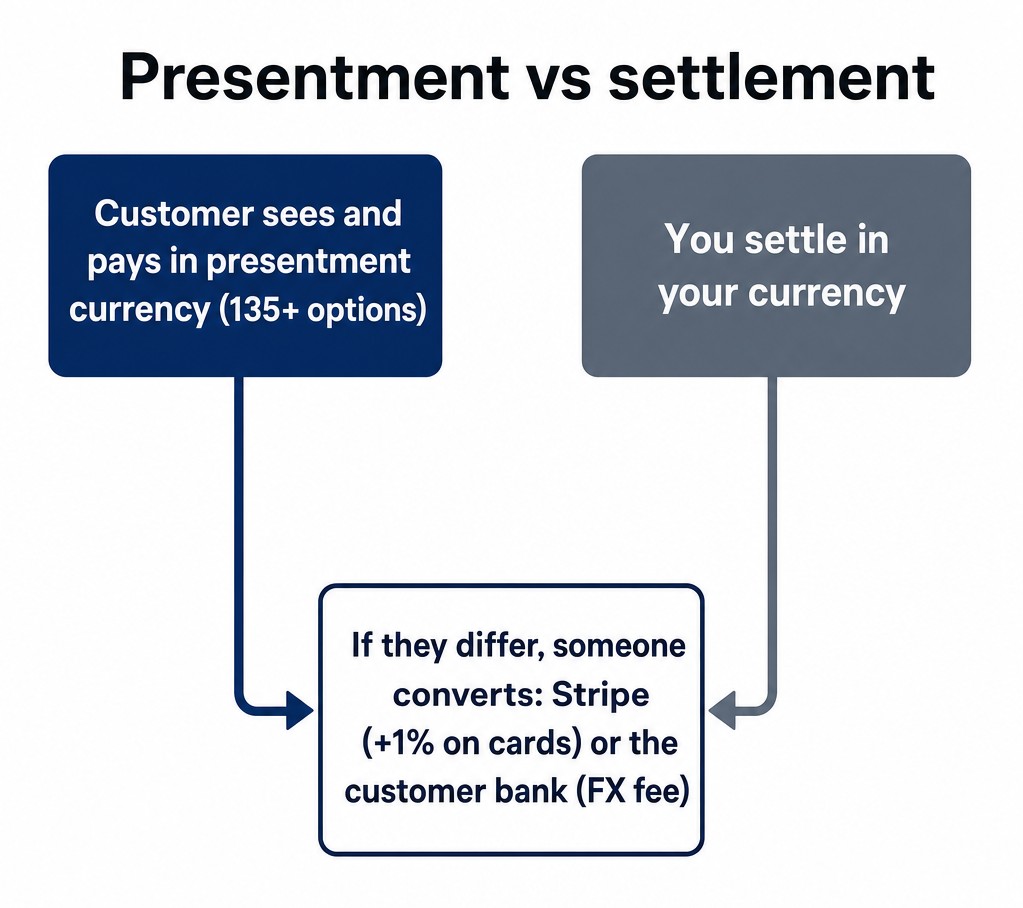 Presentment vs settlement: the customer pays in their currency, you settle in yours, and someone converts if they differ
When the two differ, someone converts. If you charge in euros and settle in USD, Stripe converts the proceeds to dollars on the way to your balance (on standard card pricing, that’s the “+1% if currency conversion is required” line). If instead you charge the Berlin customer in USD, her bank does the converting on her statement — and as the docs warn, her bank or card issuer might charge her a foreign exchange fee. In practice nearly every cross-border card sale pays a conversion cost somewhere; the only question is whose statement it shows up on.
The invisible conversion tax on your conversion rate
That last point deserves its own section, because it’s the real business case. When you charge internationally in your home currency, three frictions stack against the sale: the customer mentally converts your price (and tends to round against you), the statement arrives with an amount that doesn’t match what they remember, and some banks tack on a foreign-transaction fee the customer blames on you — in the worst case, an amount she doesn’t recognize becomes our disputes guide’s problem. None of these show up in your analytics as “lost to currency.” They show up as a slightly worse conversion rate in every non-domestic market.
Stripe’s own framing for charging in local currencies: it “can improve customer conversion and authorization rates, while lowering payment processing costs.” Two of those are obvious (familiar price converts better, fewer cross-border issuer declines), and the third is the sleeper — some payment methods in some markets are simply cheaper or only available in local currency.
The math on a $49 sale, three ways
Same customer, same product, three ways to run the payment — and three different people paying for the conversion:
| Setup | Customer sees | Who pays for conversion |
|---|
| You charge USD only | $49 now; a converted amount + possible FX fee from her bank later | The customer, on her statement, with the blame aimed at you |
| You charge EUR, settle in USD | The EUR equivalent of $49 (about €45), clean and exact | You: +1% card conversion (about $0.49 on this sale) |
| Adaptive Pricing | A localized price with the conversion fee shown at checkout (from 2%) | The customer, transparently, as a disclosed checkout line |
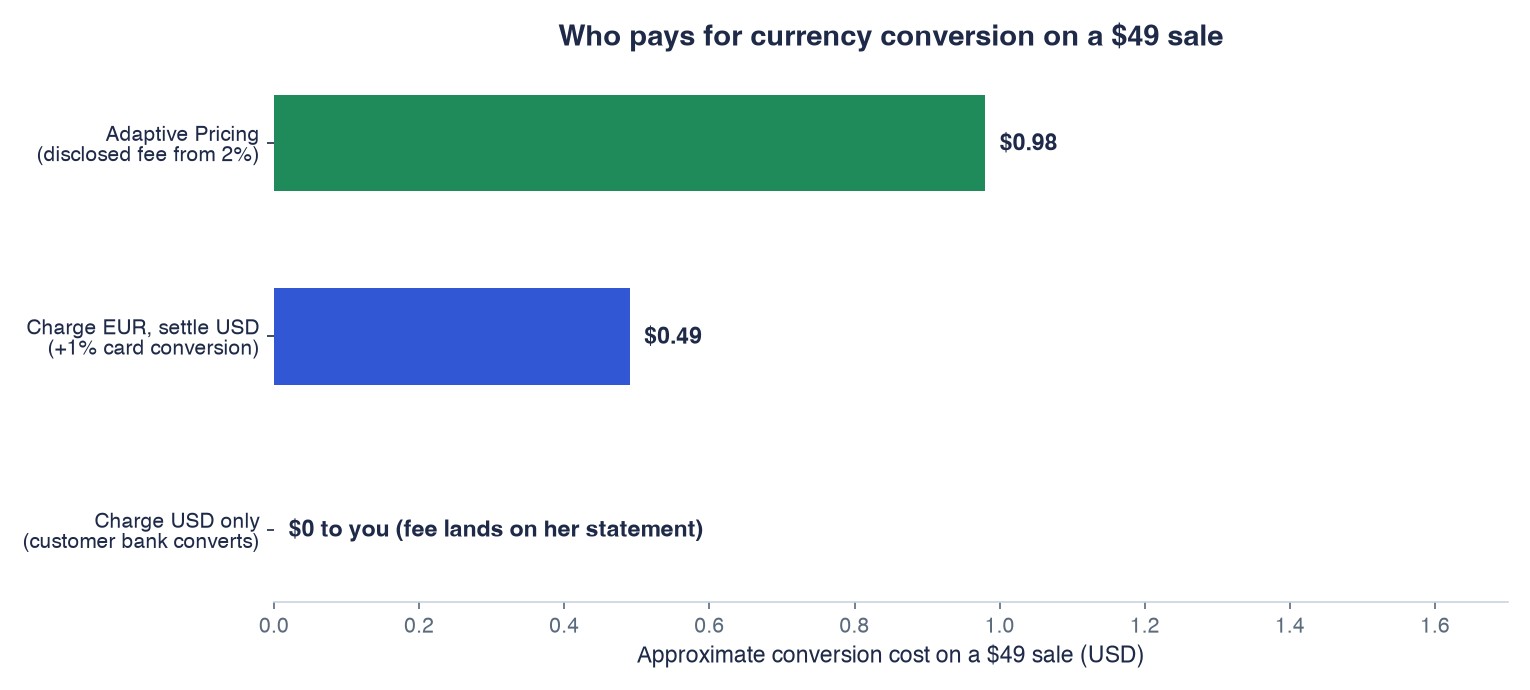 Who pays for currency conversion on a $49 sale: three setups compared
Notice what’s not different: the product, the price intent, and your settlement currency. What changes is where the conversion cost sits and how honest it looks. Option two hides a full 1% in your margin. Option three discloses a larger fee to the customer but converts better because the whole flow feels local. Option one is the default that quietly taxes your international conversion rate.
One presentation detail to check whichever route you take: look at your actual converted prices, not just the feature flag. A clean $49 rarely lands on a clean €45 — converted prices drift with the rate, and pricing psychology doesn’t stop at the border — review what the localized amounts look like on your real checkout before you call the project done.
Adaptive Pricing: the automated version
Maintaining price lists in 15 currencies by hand is a job nobody wants, which is why Stripe built the automated layer. Per the Adaptive Pricing documentation, it covers more than 150 countries: Stripe uses machine learning to determine the most relevant presentment currency for each customer, then automatically calculates the localized price and handles the conversion. Prices are calculated in real time using an exchange rate guaranteed for 24 hours — so the price a customer sees at noon is still honored at midnight — and presenting local currency unlocks payment methods that require it.
The availability details that matter for a WordPress setup: Adaptive Pricing is always enabled for Payment Links — no toggle, it’s just on. For Checkout, it’s managed from your payment settings in the Dashboard, and it works in both sandbox and live mode (safe to test first, as the checklist below shows). Disabling it later doesn’t unwind anything already running: existing converted Checkout Sessions and active local-currency subscriptions keep their terms.
The recurring-payment nuance
Selling subscriptions across currencies has one rule that saves support tickets: once a subscription is running in a currency, it stays in that currency. The Adaptive Pricing docs make this explicit in reverse — the docs note that disabling it doesn’t unwind already-converted Checkout Sessions or active local-currency subscriptions. Your Berlin subscriber who started in euros keeps renewing in euros, on the terms she signed up for, even if you later restructure your whole pricing. That’s obviously the only sane behavior — imagine your gym membership switching currency mid-year — but it has a planning consequence: currency decisions for subscription products are sticky per-customer, so make them deliberately at checkout time rather than assuming you can harmonize everything later.
What it costs: the honest fee picture
Multi-currency is not free, and any guide that skips this paragraph is selling something. On Stripe’s standard US pricing, customers using conversion features can be “presented a conversion fee starting at 2%” — and Stripe separately applies a +1% card conversion fee when charge and settlement currencies differ, so confirm how they stack for your exact setup — one or both may apply — before quoting anyone a total. Stack it against the benefits honestly: if presenting euros lifts your European conversion rate by more than a couple of points, the fee pays for itself; if your sales are 96% domestic, it’s overhead for nothing.
One more cost-side nuance most sellers miss: the settlement side is yours to optimize separately. Supported countries can settle in additional currencies into matching bank accounts — if you collect meaningful EUR volume, settling in euros to a euro account avoids converting twice (once per charge, once per payout). That’s a treasury decision, not a marketing one, and it’s in the same payouts documentation we covered in the payout schedule guide.
When it’s actually worth it
The decision framework I’d use (and do):
- Under ~10% international revenue: skip it for now. The fees and the operational attention outweigh the conversion lift — but set a calendar note to re-check quarterly, because international share has a way of creeping up on successful stores.
- 10–30% international, concentrated in 1–2 currencies: turn on Adaptive Pricing and let the machine learning do the work; watch the conversion rate by country for a month before and after, and keep an eye on the disclosed conversion fee’s effect on abandonment at the same time.
- Serious volume in a specific market: add local payment methods to the currency presentation (this is where the “unlocks payment methods” line pays off — some markets convert dramatically better on their domestic rails; we’ve covered iDEAL in the Netherlands and the SEPA methods in Europe separately), and consider multi-currency settlement to stop paying conversion both ways.
Whichever tier you’re in, measure by country, not in aggregate. Multi-currency improvements never show up as a site-wide bump; they show up as Germany quietly catching up to your domestic conversion rate.
What to check in your WordPress stack
Multi-currency is mostly decided in Stripe settings, but the WordPress layer still owns the customer experience. Three checks before you call it done:
- Label consistency. Whatever amount your form displays, its currency label must match what the customer will actually be charged. A form saying “$49” that actually charges something like €45 is how “I was charged the wrong amount” disputes are born.
- A real end-to-end test. Run one sandbox payment from the target market’s perspective — local currency presented, local method offered, receipt in the same currency as the charge. Sandbox and live mode both support Adaptive Pricing, so the test is faithful.
- Receipts and emails. Your confirmation emails should state the charged amount and currency exactly as it hit the card. The statement-descriptor logic from our disputes guide applies here too: recognition prevents chargebacks, and a mismatched currency is a recognition killer.
Bottom line
Presentment currency is what your customer experiences; settlement currency is what you reconcile. Charging internationally in your home currency makes the customer’s bank do the conversion and puts the mystery fee on the wrong statement. Adaptive Pricing automates the fix across 150+ countries — free to enable, with a customer-facing conversion fee starting at 2% that you should weigh against the lift. Full disclosure: WP Full Pay is our plugin, and whether you sell through it or any other Stripe integration, the presentment/settlement split works exactly the same — it’s decided in your Stripe settings, not in WordPress. Turn it on when your international share justifies it, and judge it by country-level conversion a month later — the aggregate number will lie to you, but Germany won’t.
Sources