A payment can move to a new state after the customer leaves your WordPress site. A bank may confirm a delayed payment, a subscription renewal may fail, or a dispute may open. A webhook lets another system tell your endpoint about that change without waiting for your site to ask repeatedly.
That simple idea hides two different workflows. You can receive events directly from Stripe, or you can ask WP Full Pay to send a successful form transaction to another service. The security model and event coverage are not the same.
This guide explains both approaches, including signature verification for direct Stripe events, duplicate-safe processing, testing, and the exact boundary of WP Full Pay notifications.
What is a Stripe webhook?
A webhook is an HTTP request sent when an event occurs. For a direct Stripe integration, Stripe sends a JSON event to a public HTTPS endpoint that your application has registered. Your handler verifies the request, decides whether the event matters, performs or queues the relevant action, and returns an HTTP response.
This is different from polling an API. Polling asks for new information on a schedule. A webhook pushes a notification to the endpoint when the event is generated. The two mechanisms often work together: the webhook starts the workflow, while an API request can retrieve the latest object when the handler needs more context.
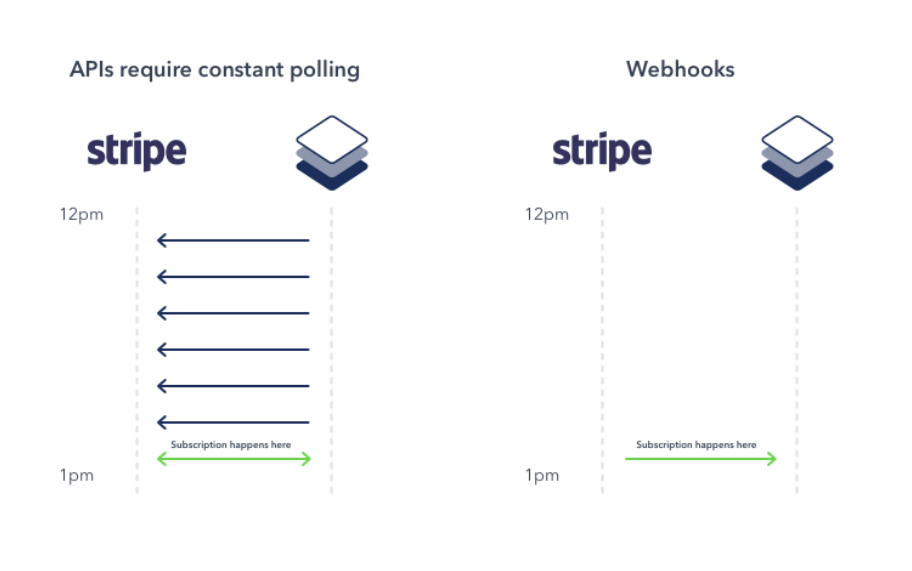 Polling checks repeatedly, while a webhook delivers a notification after an event occurs.
Choose the webhook path you actually need
The phrase Stripe webhooks in WordPress can describe either of the following paths. Decide which sender and event scope you need before building the receiver.
| Path | Sender | Best fit | Important boundary |
|---|
| Direct Stripe webhook | Stripe | Reacting to selected Stripe account events, including payment, invoice, subscription, or dispute changes | Your endpoint must verify Stripe’s signature and handle Stripe’s delivery behavior |
| WP Full Pay form notification | WP Full Pay | Sending a successfully recorded form transaction to an external service | It is configured per form, uses POST, and does not provide every failed, incomplete, or disputed Stripe event |
A direct Stripe webhook is the right choice when a workflow depends on events that happen outside the initial successful form submission. Examples include a failed invoice payment, a later subscription change, or a dispute. A WP Full Pay notification is a narrower shortcut when another system only needs the successful transaction recorded by a particular form.
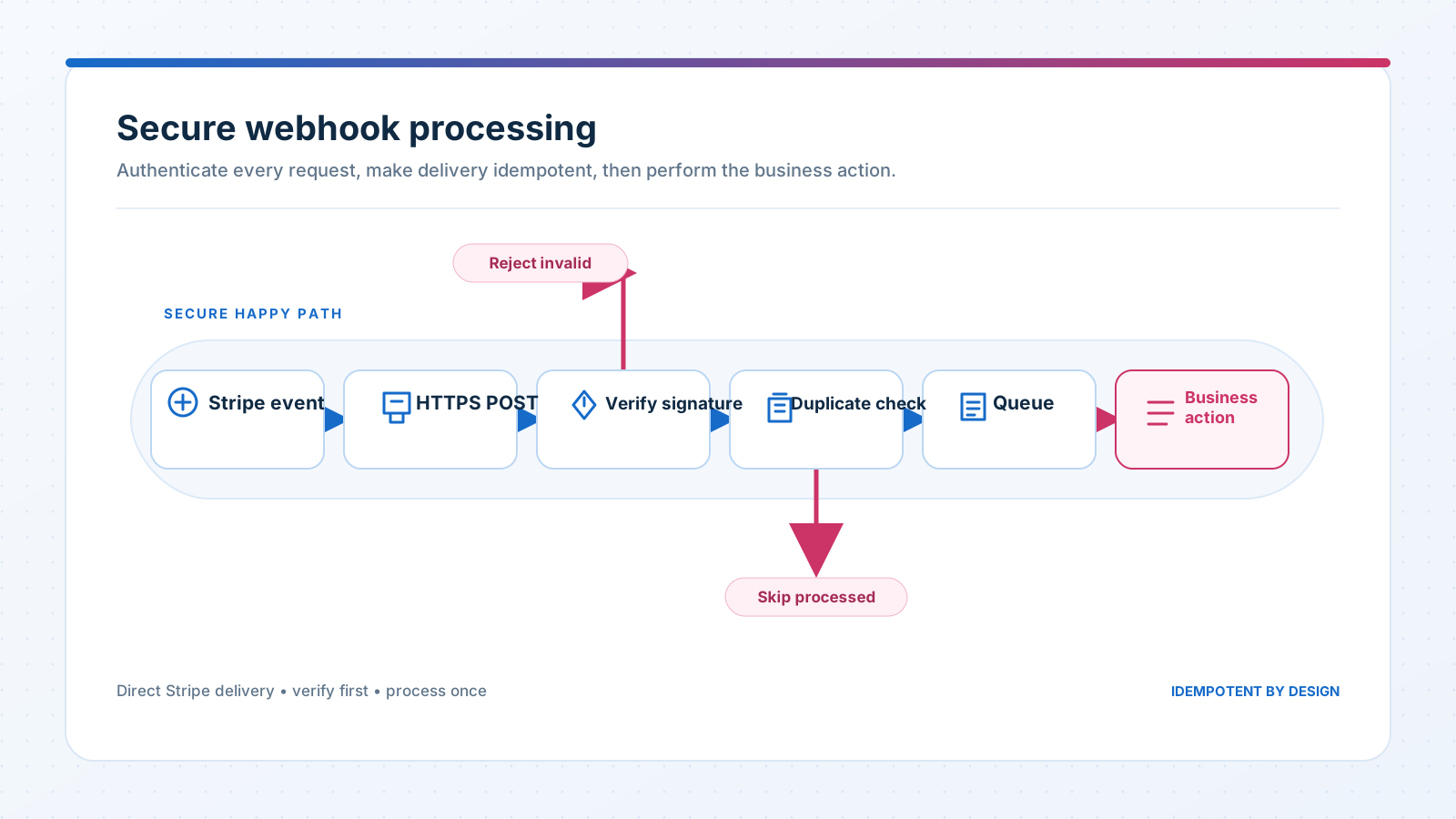 A reliable handler authenticates the request and checks for duplicates before any business action runs.
Select only the direct Stripe events you need
Stripe offers many event types, but subscribing to all of them adds noise and load. Start with each business action, then identify the event that should start it. Stripe’s current event type reference is the source of truth for exact names and object payloads.
- Fulfillment: Choose the event that represents a usable payment result for the payment flow. A completed checkout session can still involve a delayed payment method, so do not treat one event name as universal proof that funds are final.
- Subscription access: Listen for the invoice and subscription states that your access rules truly use. Keep failed-payment recovery in the dedicated recurring-payment troubleshooting workflow.
- Disputes or refunds: Subscribe only if the receiving system has a defined operational response, such as pausing fulfillment or opening a review task.
Record the object and status that each handler expects. Event payload structures are tied to an API version, and event delivery order is not guaranteed. If a required related object has not arrived yet, retrieve its current state through the API instead of assuming an earlier event must have been processed.
Secure a direct Stripe webhook endpoint
1. Use a dedicated HTTPS route
Register a public HTTPS endpoint for live events. Let it accept POST requests and reject methods the handler does not use. Do not put an API key, signing secret, password, or access token in the endpoint URL. URLs are commonly copied into logs, browser history, and monitoring tools.
Keep the endpoint secret in protected server configuration. A Stripe webhook signing secret begins with whsec_ and is different from a Stripe secret API key. Test, live, Dashboard-managed, and Stripe CLI endpoints can each have different signing secrets. The separate Stripe API keys guide explains why secret values must stay out of public code and client-side settings.
2. Verify the Stripe signature before acting
For direct Stripe webhooks, verification uses the untouched request body, the Stripe-Signature header, and the endpoint’s signing secret. Stripe recommends using an official library. Read the raw body before middleware parses, reformats, or re-encodes the JSON, because even a harmless body change can make verification fail.
Return a client error for malformed payloads or invalid signatures. Never grant access, fulfill an order, update a subscription, or trigger a refund from an unverified event. Stripe’s signature troubleshooting guide covers the common raw-body and wrong-secret failures.
receive raw request body
read Stripe-Signature header
verify with this endpoint's whsec secret
reject invalid requests
check whether the event was already processed
enqueue the business action
return a 2xx response
3. Make processing idempotent
Stripe can deliver the same event more than once, and a manual resend can overlap with an automatic retry. Store processed event IDs and make the business action safe to repeat. For workflows where separate Event objects can describe the same object change, Stripe recommends considering the object ID together with the event type.
Idempotency belongs at the action boundary. A duplicate delivery must not create a second shipment, send another entitlement, or write a second accounting record. Keep enough audit information to explain why the duplicate was skipped without logging full payment payloads unnecessarily.
4. Acknowledge quickly and process asynchronously
Verify the request and persist the work, then return a successful 2xx response before slow actions run. Put email, shipping, CRM, and reporting work on a queue where possible. A slow response can time out, which encourages another delivery even if the first request already started its work.
Do not build logic that depends on events arriving in chronological order. Recheck the stored state before applying a transition, and fetch the current Stripe object when the workflow needs authoritative context.
5. Monitor delivery and business outcomes
A 2xx response confirms that the endpoint accepted the delivery. It does not prove that a queued email, shipment, access change, or accounting update later succeeded. Track each delivery through useful states such as received, authenticated, queued, processed, skipped as a duplicate, and failed.
Alert on repeated verification errors, a growing worker queue, and business actions that remain incomplete. A periodic reconciliation job can compare important Stripe objects with local records and surface a gap that delivery logs alone would miss.
Test direct Stripe webhooks before launch
Test the receiver with sandbox data before registering the live endpoint. Stripe supports local event forwarding and simulated events through the Stripe CLI. Use the signing secret printed by the CLI for CLI-forwarded events, not the secret from a Dashboard endpoint.
- Send one expected event and confirm that the intended action runs once.
- Replay the same event and confirm that the action is not duplicated.
- Send an invalid signature and confirm that the endpoint rejects it without changing business data.
- Delay the worker or force an internal failure, then confirm that the queue and retry policy recover safely.
- Test related events in an unexpected order and verify that the final stored state remains correct.
After deployment, use Stripe Workbench’s event-delivery view to inspect the response code and retry status. A redirect response is treated as a failed delivery, so register the final endpoint URL rather than a URL that redirects elsewhere.
WP Full Pay offers a separate outbound webhook feature in Free and Pro. WP Full Pay is maintained by Themeisle, which also publishes this site. The feature sends form submission data to an external service after a transaction is successfully recorded.
- Open the intended payment form’s settings.
- Select the Webhook tab.
- Enter the receiving webhook URL and any required custom headers.
- Save the form, then use Test Webhook to inspect the receiver’s request and response.
The current WP Full Pay webhook documentation says configuration is per form and only POST is supported. If the receiving service supports a dedicated authorization header, use a secret header rather than a secret query parameter, then verify the header before accepting the payload.
⚠️ Scope boundary: A WP Full Pay form notification is triggered only after a transaction is successfully recorded. Do not rely on it to forward failed payments, incomplete payments, later disputes, or every Stripe account event. Use a direct Stripe webhook when the workflow needs those states.
Stripe signature verification applies to requests sent directly by Stripe. A WP Full Pay notification is sent by your WordPress site, so use the authentication mechanism supported by your receiving service and the custom headers available in the form settings. Test the exact payload instead of assuming it matches a Stripe Event object.
Troubleshoot webhook delivery
| Symptom | What to check |
|---|
| No direct Stripe request arrives | Confirm the event destination, account scope, selected event type, final HTTPS URL, firewall rules, and public reachability. |
| Signature verification fails | Use the raw body, the request’s Stripe-Signature header, and the signing secret for that exact endpoint and mode. |
| The action runs twice | Store processed event IDs and enforce idempotency where the business record is created or changed. |
| Stripe reports a timeout | Return the 2xx response after verification and durable enqueueing, then run slow work in a worker. |
| A WP Full Pay failure event never arrives | This is outside the per-form notification scope. It triggers only after a transaction is successfully recorded. |
| WP Full Pay test delivery fails | Check that the receiver accepts POST, parses JSON, recognizes the configured headers, and logs its response error. |
Webhook launch checklist
- The sender and event scope match the business workflow.
- The live endpoint uses HTTPS and contains no secret in its URL.
- Direct Stripe requests are verified against the raw body before any action.
- Duplicate and out-of-order deliveries cannot corrupt state.
- Slow work is queued and the endpoint acknowledges verified delivery quickly.
- Sandbox tests cover success, rejection, replay, failure, and recovery.
- Logs capture identifiers and outcomes without exposing secrets or unnecessary payment data.
A webhook is a notification channel, not a guarantee that the final business action happened. Secure the sender, make the handler safe to repeat, monitor every delivery path, and choose direct Stripe events whenever the workflow extends beyond a successful WP Full Pay form transaction.