Moving one-off payments from PayPal to Stripe is easy: swap the form, done. Moving recurring subscribers is the version that keeps merchants up at night — because every subscriber who has to dig out their card and re-enter it is a subscriber who might simply… not. Involuntary churn is the tax on badly planned migrations, and with a clean card-data transfer it’s largely avoidable.
This is the playbook I’d follow (and have followed) to move a subscriber base without leaking revenue: new subscribers land on Stripe from day one, existing cohorts move through Stripe’s official data-migration process, PayPal stays alive until the first Stripe charge clears, and nobody’s card gets “lost” in between. We’ve compared Stripe and PayPal as platforms before — this post is the how-to for the switch itself, sourced from Stripe’s migration documentation.
Why migrations leak revenue
Three failure modes account for most avoidable migration churn in practice. First, the re-entry wall: if your plan requires subscribers to re-enter card details, expect a meaningful slice to treat it as an accidental cancellation. Second, timing collisions: charge someone on both systems in the same week and you’ll spend a month issuing refunds and apologies; charge them on neither and you’ve silently cut their service. Third, the quiet gap: a PayPal billing agreement canceled before its Stripe replacement is confirmed working — the subscriber doesn’t notice until access breaks, and by then they’re not a subscriber, they’re a support ticket.
Every phase below exists to defeat one of those three. The order matters more than the tools.
Before anything moves: audit the subscriber base
You can’t migrate what you can’t enumerate, so the real Phase Minus-One is an audit. Pull your active PayPal billing agreements into a spreadsheet and treat it as the migration’s source of truth: how many active subscribers, at which amounts and intervals, on which renewal dates. Note the tails — subscribers whose cards expire in the next couple of months (they’d need a card update soon regardless; flag them for the plan-B campaign even if the import works), and any paused or past-due agreements (decide now whether migrating them is worth it; a migration is a legitimate moment to let dead wood go).
Also record your current monthly churn rate. You need a baseline to tell a normal month from a migration problem — without one, every post-migration cancellation feels like your fault, and some months just look like that.
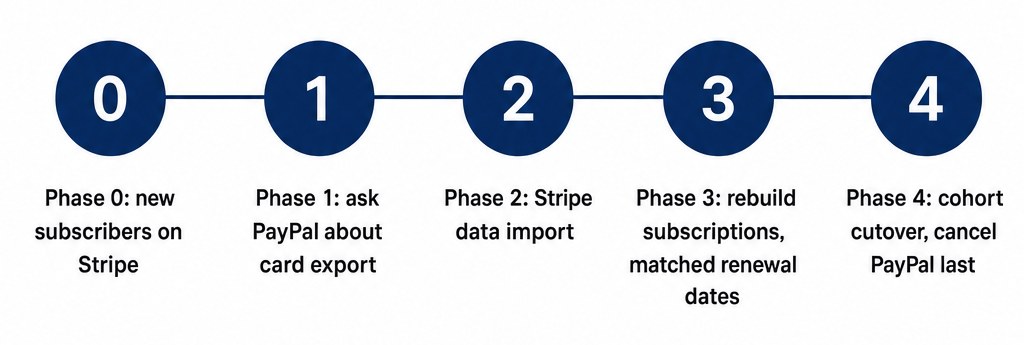 The five migration phases in order: new subscribers on Stripe first, PayPal canceled last
Phase 0: all new subscribers land on Stripe, starting today
This is Stripe’s own opening advice in its migration overview: “Develop your data migration plan, starting with new customers. Your end goal is to migrate 100% of new customers, then migrate existing customers.” Before you touch a single existing subscriber, point every new signup at Stripe. With WP Full Pay (our plugin — full disclosure, and one of two places this piece mentions our product), that’s a subscription form on your pricing page; with any other Stripe-integrated tool, the principle is identical.
One setup detail worth doing now rather than during the cutover: mirror your plan structure in Stripe before the first new subscriber arrives. Same plan names, same prices, same trial logic and signup incentives as the PayPal versions — because in Phase 3 you’ll be mapping existing subscribers onto these plans, and a mismatch (“PayPal Gold” vs “Stripe Gold Annual”) is where billing-anchor bugs are born. If the migration is also your excuse to reprice, reprice after the move, not during it.
Why first? Because it stops the bleeding. Every week you delay, the PayPal cohort you’re dreading to migrate grows — and the new-customer flow is also the safest place to shake down your Stripe forms, confirmation emails, and access provisioning before you trust them with the revenue base. Give it at least a couple of weeks of clean new signups before Phase 2.
Phase 1: open the PayPal export conversation early
Here’s the step that gates your whole timeline, and it’s the one merchants leave for last. To move existing subscribers without making them re-enter cards, the card data itself has to travel from PayPal to Stripe — and that transfer has to happen between the two processors, over a PCI-compliant channel, not through your laptop. Stripe’s own instruction is simple: “Contact your previous processor to understand their migrations process.”
So open a support case with PayPal in week one and ask directly about exporting your vaulted card data / billing agreements to another PCI-compliant provider. Two honest possibilities: they can support a transfer (in which case Phase 2 is mostly paperwork and waiting), or they can’t/won’t for your account type — in which case you still have a solid plan B, the card-update campaign in Phase 4. Either way, knowing early changes your schedule, not your outcome. Don’t skip the ask because you assume the answer.
Phase 2: Stripe’s official import process
Stripe has a documented, official path for this — a payments data import — and its design matches the no-downtime rule: “This process allows you to accept and charge new customers on Stripe and continue charging your existing customers with your current processor until the migration is complete. Your customers incur no downtime.”
The mechanics, per the documentation: you submit a data migration request (via Stripe’s support channel for migrations), and the Stripe Migrations team will want to know your previous processor, your Stripe account number, how many customer records you’re migrating, and which payment-method types are involved. The transfer itself happens over a secure, PCI-compliant channel between the processors — at no point do card numbers pass through your WordPress server or your email, which is exactly how it should be.
Set expectations on timing: this is measured in weeks, not an afternoon, and it depends partly on how fast your old processor moves. That’s fine — Phase 0 means revenue is flowing on Stripe the whole time.
Phase 3: rebuild the subscriptions in Stripe Billing
Imported card data is useless until it’s attached to live subscription schedules. Stripe’s subscription migration guide gives you two routes: the Billing migration toolkit (no code — built for exactly this, including imports from third-party billing systems) or the APIs if you have developer help and custom logic. The documented stage order mirrors this article: build your Billing integration, migrate the customer/payment data, then import the subscriptions themselves.
The detail that saves you from timing collisions: when you recreate each subscription, match its billing anchor to the subscriber’s existing renewal date from PayPal, not the import date. A subscriber who renews on the 14th should keep renewing on the 14th — that’s what makes the cutover invisible to them, and it’s what makes the next phase safe.
Phase 4: the overlap window and cutover
Now the choreography that prevents the double-charge and the quiet gap. Migrate in cohorts — say, monthly subscribers first, annuals second — and for each cohort:
- Recreate the Stripe subscriptions with matched renewal dates.
- Wait for the first successful Stripe charge for that cohort (for monthly plans, that’s at most one cycle away).
- Only then cancel the corresponding PayPal billing agreements.
- Watch failed-payment reports on both systems for two more cycles before declaring the cohort done.
Yes, this means running both systems in parallel for a few weeks. That’s not waste, it’s insurance — the overlap window is the price of zero involuntary churn, and it’s cheap compared to re-acquiring lost subscribers.
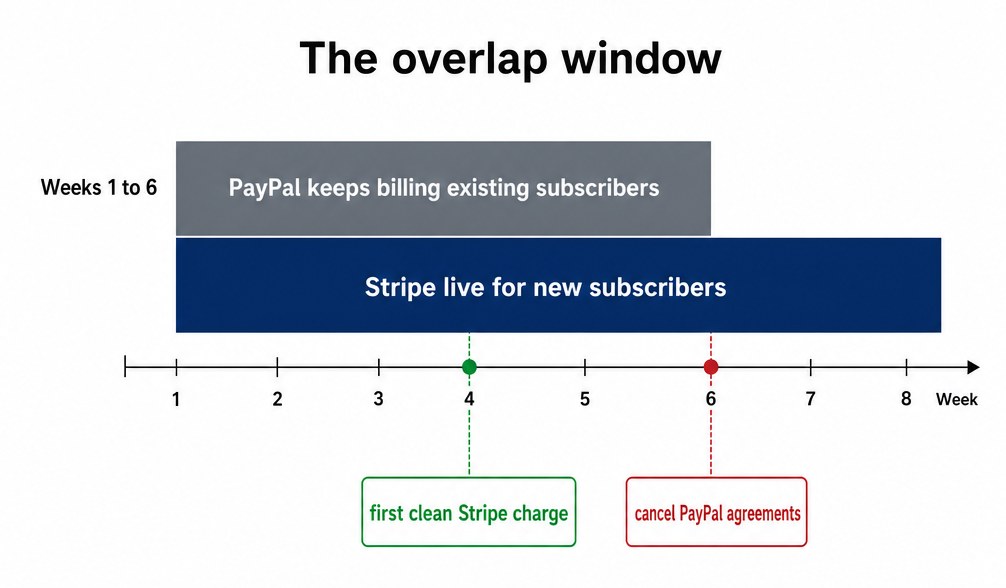 The overlap window: PayPal keeps billing existing subscribers while Stripe takes new ones; cancel PayPal only after the first clean Stripe charge
Plan B — the card-update campaign. If PayPal can’t export your card data, the re-entry wall becomes unavoidable for the existing cohort, so you manage it instead of suffering it: a short email sequence (announcement, reminder, final call) explaining the move, linking to a Stripe payment form that takes thirty seconds to complete, sweetened with something small — a bonus month, a locked-in rate, a piece of content. Frame it honestly as “we’re upgrading our payment system” rather than hiding it; subscribers forgive maintenance, they don’t forgive surprises on their card statement. Expect attrition anyway, and schedule the campaign when your churn can afford it. A cadence that works: announcement on day 1, reminder on day 7 with the incentive restated, final call on day 14 with a clear “your access continues only if the card moves” deadline. After the deadline, move the stragglers to a manual-winback list rather than canceling them outright — a personal email recovers a surprising share of the remainder over the following month.
The cost picture after the move
Since migrations are usually about money, run the post-move numbers before you start. Stripe’s standard US online rate is 2.9% + $0.30 per card transaction. On the plugin layer, WP Full Pay’s free tier adds a 5% application fee per transaction, while a paid license removes it — Basic is currently introduced at $79.50/year for one site per the pricing page (renewals can be higher, so re-run this against your actual renewal price). Break-even at that rate: $1,590 in annual volume. If your migrating subscriber base bills more than about $133 a month at Stripe’s standard US rate — and if you’re reading this, it almost certainly does — put the license in the budget from day one, or the “savings” migration quietly costs more than it saves.
Bottom line
A churn-safe migration is boring by design: new subscribers on Stripe immediately, the export conversation with PayPal in week one, Stripe’s official import for the card data, subscriptions rebuilt on matched renewal dates, cohorts cut over only after their first clean charge, and PayPal decommissioned last — never first. Do it in that order and your subscribers’ only sign of the move is a different name on their statement. Which, if you read our disputes playbook, you’ll recognize as the next thing worth getting right.
Sources