You made your first sale on Monday. It’s Friday, your Stripe balance shows the money right there, and your bank account shows nothing. You refresh. Still nothing. You start reading forum threads at midnight, half of which insist Stripe is holding your money on purpose. Welcome to one of the most common questions in payments: when does Stripe actually pay out?
The short answer: slower at the start than later, and on a schedule you can mostly control once you know where the knobs are. In this guide, I’ll walk through how payout timing really works — the first-payout hold, settlement timing by country, the difference between your payout schedule and your settlement speed, and when Instant Payouts are worth their fee. Everything is from Stripe’s own payout documentation and the US pricing page, linked throughout.
The first payout is the slow one
If you’re new to Stripe, brace yourself: per Stripe’s payouts documentation, “after you successfully receive your first live payment, Stripe typically schedules your initial payout to complete within 7–14 days.” And it adds the honest follow-up: “It can take longer depending on your industry, country of operation, and risk level.”
Read that as a trust period, not a bug. A brand-new account with no history gets extra review, and some industries and regions get more of it. The practical moves: make that first sale early (even a small real transaction starts the clock), finish every verification step Stripe asks for the day it asks, and don’t plan a launch where day-one revenue pays day-three bills. One more thing that’s completely normal and still panics everyone: the 7–14 day window is a first-time experience, not your permanent schedule — later payouts simply follow your account’s normal settlement timing.
How the schedule works after that
Two separate clocks run your payouts, and confusing them is a common source of “where’s my money” questions:
- Settlement timing is how long a captured payment takes to become available in your balance. It varies per country and is expressed as “T+X”: standard timing is T+2 in the US, T+3 in the UK and most of Europe. Your payment methods can shift it too — cards are the fast lane, while bank debits like ACH run their own slower clocks (T+4 standard, covered in our ACH vs cards comparison).
- Your payout schedule is how often Stripe sends the available balance out: daily, weekly, or monthly, your choice in the Dashboard. Stripe’s own example: with daily payouts and 3-business-day settlement timing, you get paid daily from transactions captured 3 business days earlier.
Two corollaries worth memorizing. First, changing the schedule does nothing to the settlement clock — “choosing a payout schedule doesn’t change how long it takes for your pending balance to become available.” Switching to daily payouts doesn’t make a Tuesday charge available sooner; it just means available funds leave daily instead of weekly. Second, payouts scheduled on weekends or holidays land the next business day — banks, not Stripe, set that rule.
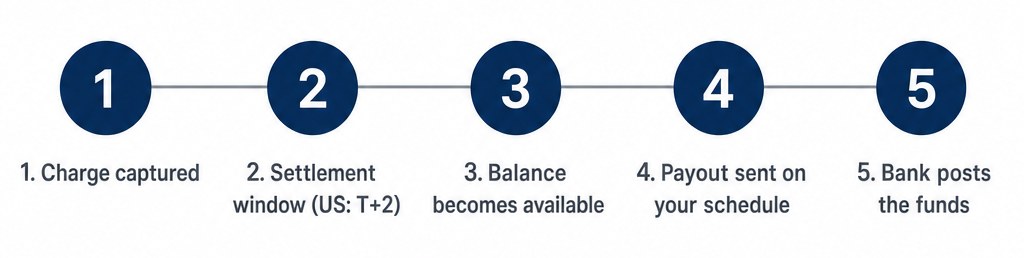 The payout journey: charge captured, settlement window, balance available, payout sent, bank posts the funds
Reading your balance: pending vs available
Half the “missing money” confusion lives in one Dashboard distinction. Your Stripe balance splits into pending (captured, still inside its settlement window) and available (cleared the window, ready to leave). Payouts — of any kind, on any schedule — only ever draw from available. So when a sale from two days ago “isn’t paying out,” it usually isn’t stuck; it’s simply still pending on its T+2 or T+3 clock, and it will convert to available on schedule without you touching anything.
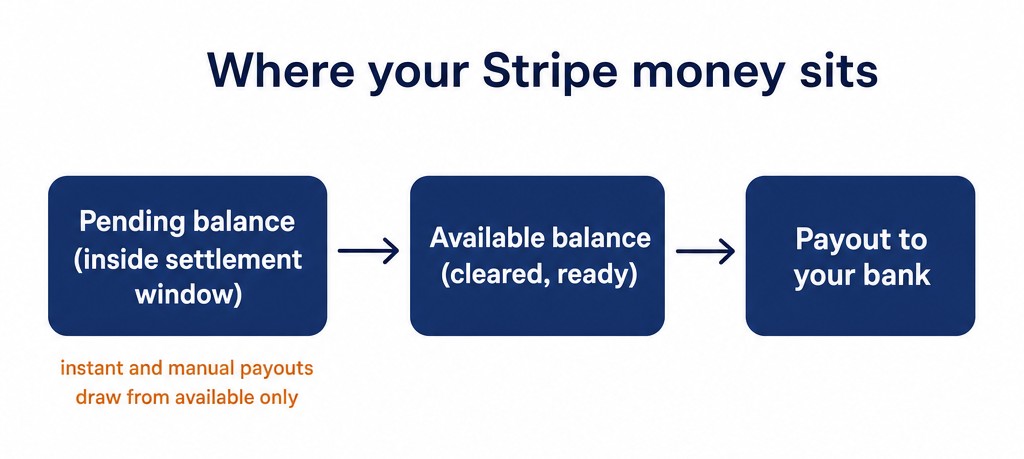 Where your Stripe money sits: pending balance, available balance, payout to your bank
A worked example for a US account on the default daily schedule, standard T+2 timing: a card charge captured Monday converts to available Wednesday and typically lands in your bank Wednesday to Thursday depending on the bank’s own posting speed. A charge captured Friday becomes available Tuesday (business days only) — which is why weekend revenue always feels slower, and why a Tuesday-Thursday cadence of big sales is the cash-flow-friendly pattern.
Instant Payouts: money in minutes, for a price
When cash flow gets tight, there’s the fast lane: Instant Payouts send funds to an eligible debit card or bank account, requestable any time — weekends and holidays included — with funds “usually” appearing within 30 minutes. That “usually” is doing real work in the sentence: the debit-card rails are fast, but your bank still posts on its own schedule, so treat 30 minutes as the typical case rather than a promise — the first time you rely on it shouldn’t be the time you desperately need it. In the US, the fee is 1.5% of the payout volume with a 50¢ minimum (the fee varies by region, so check your own pricing page if you’re elsewhere).
The honest way to judge that fee is against the alternatives for the same job — getting a $2,000 balance out this week, every week for a year:
| Route for a $2,000 weekly payout | Speed | Annual cost |
|---|
| Scheduled weekly payout | Arrives on your weekly day | $0 |
| Manual same-day payout (US, before 5 pm ET) | Same business day | $0 |
| Instant Payout every week | ~30 minutes, any day | ~$1,560 (1.5% × $104,000) |
Three catches. New accounts aren’t immediately eligible — instant access is earned with account history, same as the first-payout hold. The 1.5% fee is on the whole instant amount, so routinely pulling $2,000 a week instantly costs about $1,560 a year (the US pricing page lists no per-payout cap, just the 50¢ minimum, so the 1.5% applies to the whole amount) — that’s an expensive habit compared to just moving your schedule from monthly to weekly, which is free. And eligibility can be checked in your Dashboard before you ever need it urgently. My rule of thumb: Instant Payouts are for genuine emergencies and one-off timing squeezes, not a standing cash-flow strategy you build the business around.
Manual and same-day payouts
Between “wait for the schedule” and “pay 1.5% for instant” there’s a middle option most merchants never notice: manual payouts. In the US, manual payouts initiated before 5 pm Eastern are eligible for same-day arrival — limited to 10 per day at up to $1 million each — and all other manual payouts typically arrive within 1 business day. That’s often the right answer to “I need this specific balance today”: free, fast, and built into the same Dashboard page.
Where manual payouts genuinely earn their keep: month-end bookkeeping (pull the balance on your schedule, not Stripe’s), the occasional large payment you want out of the account the same day for security reasons, and testing your bank connection when you first set up — one small manual payout confirms the whole chain works before real revenue depends on it.
The small print worth knowing
- Minimum payout amounts exist. If your available balance is under the minimum (in the US: less than one cent), it simply waits in your Stripe account until more payments push it over.
- Non-standard bank accounts fail more. Virtual accounts (N26, Revolut, Wise-style) work, but Stripe itself warns of higher payout failure rates on them. A failed payout returns to your Stripe balance and costs you days.
- Multi-currency settlement is available in supported countries — useful if you collect in several currencies and want to avoid forced conversions (see our multi-currency guide).
- Payout failures are mostly self-inflicted. A mistyped account or routing number, a closed account, or a name mismatch is the classic trio; the failed payout bounces back to your Stripe balance, and Stripe reattempts at the next scheduled interval once you fix the details. Verify the account details the week you set up, not the week rent is due.
- Some countries play by preset rules. Local regulations can fix the schedule — Japan, for example, has no daily payouts and defaults to manual. If you’re outside the US/UK/EU core, check your country’s row in the payouts doc before promising anyone a schedule.
- Your plugin is irrelevant here. Payouts are a Stripe-account feature: whether you sell through WP Full Pay (our plugin), WooCommerce, or raw Payment Links, the timing above is identical. If money seems late, the answer is always in the Stripe Dashboard, not in WordPress.
When a payout seems late: the 5-minute triage
Before contacting anyone, work this list in order — it resolves almost every “late payout” without a support ticket:
- Check available vs pending on the balance page. If it’s pending, it isn’t late — it’s inside its settlement window, and no human can speed that up.
- Check your payout schedule. If you (or a teammate) set monthly, daily expectations are the actual problem.
- Check the calendar, not just the date. Weekends and holidays push to the next business day on the bank side.
- Check for failed payouts in the Dashboard — a failed payout returns to your Stripe balance, and Stripe reattempts it at the next scheduled interval once you correct the account details.
- Check your email for verification requests — Stripe can pause payouts while identity or business verification is outstanding, so an unfinished step there stalls everything.
Five minutes through that list, and you’ll know whether the answer is patience, a settings fix, or an actual support conversation — in that order of likelihood.
Bottom line
Expect 7–14 days for the first payout and don’t panic — it’s a one-time trust period. After that, US cards settle T+2 and your schedule (daily, weekly, monthly) only controls how often available funds leave, not how fast they become available. Keep Instant Payouts (1.5% in the US; fees vary by region) for true emergencies, learn where the manual same-day option lives, and use a boring, reliable bank account. Cash-flow predictability beats cash-flow speed every single week of the year. Set the schedule once, learn where the manual and instant options live before you need them, and the next time a Friday balance looks at you funny, you’ll know exactly which clock it’s on.
Sources