“Stripe is PCI compliant, so I’m covered.” Every WordPress seller has thought it, and it’s about half true — which makes it one of the more expensive half-truths in e-commerce. Stripe’s certification covers Stripe. Your WordPress site, your admin accounts, and your annual attestation are still yours.
The good news: if you take payments the way modern form plugins do — card fields hosted by Stripe itself — your slice of the PCI burden is genuinely small, and you can check it off in an afternoon. In this guide, I’ll go through what Stripe’s PCI Level 1 certification actually covers, why the integration you choose decides which questionnaire you fill in, and the short list of things that remain on your side of the fence. Sources from Stripe’s security documentation throughout.
PCI in one paragraph
The Payment Card Industry Data Security Standard (PCI DSS) is the rulebook for anyone who stores, processes, or transmits card data. Per Stripe’s integration security guide, compliance is a shared responsibility: Stripe is certified annually by an independent Qualified Security Assessor as a PCI Level 1 Service Provider — the highest level — while you, as the business accepting payments, must accept them in a PCI-compliant manner and attest to it annually. That last clause is the part “Stripe handles PCI” forgets. There is no level of outsourcing that removes your obligation to attest; there is only a big difference in how painful the questionnaire is.
The integration decides your questionnaire
PCI’s pain scales with one question: does raw card data ever touch your systems? Stripe’s guide is blunt about the expensive end — handle untokenized card numbers on your own payment page and you “might be required to meet more than 300 security controls,” with the dedicated hardware, software, and external auditors to match. That’s the world of SAQ D, and no small business should choose it on purpose.
The cheap end is the one WordPress form plugins are built on. Per Stripe’s PCI compliance guide, Checkout and Elements “host all card data collection inputs within an iframe served from Stripe’s domain (not yours), so your customers’ card information never touches your servers.” The customer types their card into a field that looks like your page but is, technically, a window into Stripe. Your server never sees the number, your database never stores it, your logs never leak it. That architecture is what puts you in SAQ A territory — the shortest self-assessment questionnaire PCI offers.
And the line between the two worlds is thinner than people assume, which is why Stripe pairs that promise with a warning: “If you do otherwise, such as writing your own code to handle card information, you might be responsible for additional PCI DSS requirements (6.3–6.5) and would be ineligible for an SAQ A.” A developer who adds custom JavaScript that reads the card field “just to validate it” has potentially dragged you out of SAQ A — without changing anything the customer sees. This is also the honest way to talk about form plugins, our own WP Full Pay included (it’s our plugin, disclosed once here): a plugin that uses Stripe-hosted fields supports your SAQ A eligibility — it doesn’t confer it, because eligibility also depends on nothing else on your site touching card data. No plugin can truthfully claim to “make you PCI compliant” by itself.
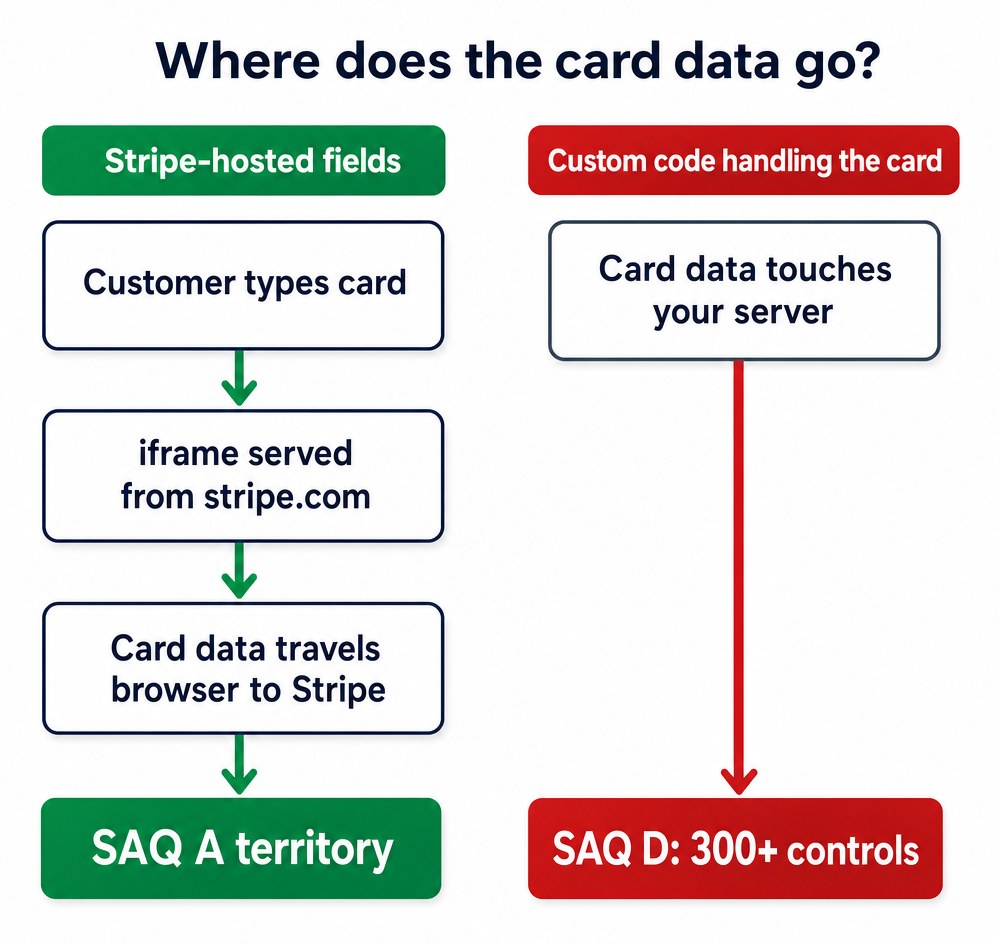 Where the card data goes: Stripe-hosted fields keep it browser-to-Stripe in SAQ A territory; custom code puts it on your server in SAQ D
What Stripe covers for you
- PCI Level 1 certification, renewed annually by an independent QSA — Visa’s Global Registry of Service Providers lists Stripe, per the link in Stripe’s own security guide.
- Hosted card fields and tokenization — the architecture above, so card data flows browser-to-Stripe without passing through your server.
- A guided attestation path. Your Stripe dashboard has a compliance section that lists the documentation your business needs, and Stripe’s PCI wizard automatically determines which SAQ type fits your integration — including the SAQ A route when you’re fully hosted, and coverage via the platform if you sell exclusively through a Connect platform like Squarespace.
- Data you’re allowed to keep. Card brand, last four digits, and expiration date returned by the API are explicitly out of PCI scope — you can store them freely for receipts, invoices, and “your card ending in 4242” emails.
What’s still on you
This is the other half of the half-truth. Even fully hosted, the following never leave your plate:
- The annual attestation itself. SAQ A is short, but it isn’t zero — it’s a questionnaire you complete and submit, every year. Put a recurring reminder in the calendar; lapsed attestation is how merchants discover PCI exists.
- TLS on every page that takes payments. Stripe’s guide requires HTTPS for its integrations, and browsers now shame non-TLS checkout pages anyway. Certificate auto-renewal plus an annual “does every payment page redirect to HTTPS” click-through covers it.
- WordPress admin hygiene. PCI cares about who can reach your systems, and on WordPress that means: updates applied (core, plugin, theme), least-privilege accounts (no shared “admin” logins, editors don’t need administrator roles), and two-factor authentication on every privileged account. A compromised wp-admin is a compromised payment page.
- Control over the scripts on your payment page. Your page loads Stripe’s iframe, but it also loads everything else your theme and plugins inject — and skimmers target exactly that supply chain. Stripe publishes the exact Content Security Policy directives for its products (which hosts your
script-src, frame-src, and connect-src must allow), and deploying a CSP is one of the highest-leverage hardening steps most WordPress payment pages never get. Know what scripts run on the checkout page, and keep the list short.
- Knowing what you may not store. Never write card numbers, CVCs, or full track data anywhere — not a note field, not a screenshot in Slack, not a “temporary” spreadsheet. The out-of-scope list above, plus anything Stripe’s API returns, is the whole list.
The plugins around the form are part of your scope
Here’s the supply-chain angle most WordPress sellers never consider. The Stripe iframe protects the card field, but the page around it is still yours — and a typical WordPress page loads scripts from the theme, a page builder, an analytics plugin, a chat widget, and whatever got installed for a Black Friday popup two years ago. Every one of those is code running on your payment page, and card skimmers don’t attack Stripe (they can’t); they compromise exactly these third-party scripts and read keystrokes around the iframe. That’s why the merchant-side PCI duties emphasize knowing what runs on your payment pages.
Practical takeaways, in rough order of impact: keep the checkout page lean (many performance plugins let you disable unused assets per page — use it); never install nulled or “GPL club” themes and plugins, which are the classic skimmer delivery vehicle; delete plugins you’re not using rather than just deactivating them; and give the payment page a regular view-source skim for script tags you don’t recognize. None of this requires a security degree — it’s inventory, and inventory is most of the battle.
Levels, volume, and when it gets heavier
PCI scales obligations by transaction volume and risk. Per Stripe’s PCI guide, Level 1 covers merchants over 6 million Visa/Mastercard transactions a year (2.5 million for American Express), anyone who’s suffered a data breach, and anyone a card association designates Level 1 — and they can’t self-assess; they need an annual Report on Compliance signed off by a QSA (or their own executive officer, on some programs). Levels 2 through 4 (everyone below that) use the Self-Assessment Questionnaires, with the specific SAQ type set by your integration — Level 2 adds its own wrinkle, since SAQ A, A-EP, and D documentation there must be signed by a QSA or a PCI-certified Internal Security Assessor. Which is why the hosted-fields decision matters so much. If you’re anywhere near Level 1, you have a compliance person and none of this is news; for everyone else, the game is “stay in SAQ A, attest annually, keep the site clean.”
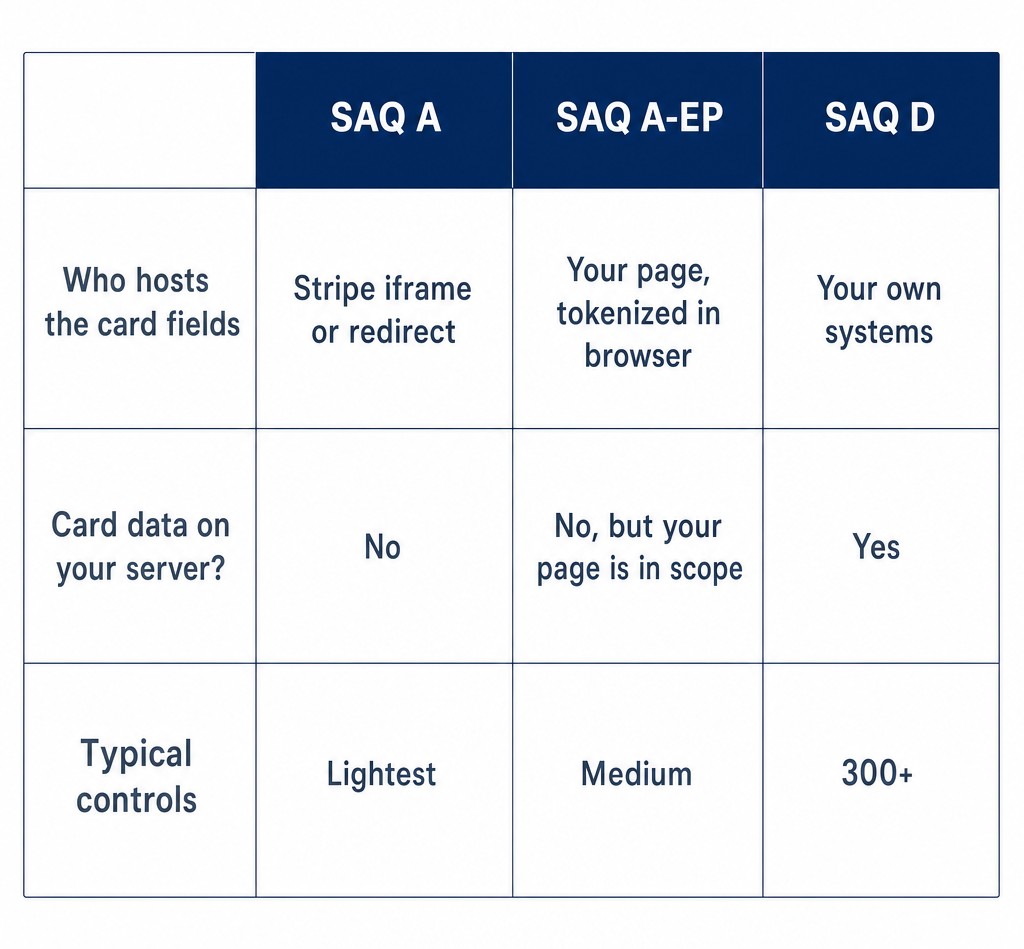 SAQ A, SAQ A-EP, and SAQ D compared: who hosts the card fields, whether data touches your server, and typical controls
The questions merchants actually ask
“If I never see card data, why do I have to attest at all?” Because you still own the page that frames the hosted fields, the accounts that administer it, and the business that gets paid. The attestation is you confirming, annually, that those pieces are in order — SAQ A just makes the confirming short.
“Do I need to hire a QSA or buy an audit?” Not at Levels 2–4. The Self-Assessment Questionnaire is exactly what it says — self-assessed. A QSA enters the picture at Level 1 volumes, or if you choose an integration that handles raw card data (don’t).
“Does my SSL certificate make me PCI compliant?” No — TLS is one requirement among several, and an “SSL plugin” alone has never made any site compliant. It’s the floor, not the ceiling.
“What happens if I just ignore the attestation?” Your acquirer is obligated to collect it, so ignoring it tends to surface as nagging from your payment provider — and, depending on the provider, can end in non-compliance fees or account restrictions. It’s roughly an hour a year — cheaper to attest.
A 30-minute self-check
Block half an hour and walk this list:
- Open your checkout page and view-source: is the card field an iframe from
stripe.com/js.stripe.com? (Yes = hosted, good.)
- Ask whoever maintains the site: does any custom code read or post-process the card field? (Anything but a firm “no” needs a developer review.)
- Check your Stripe dashboard’s compliance documents section — is your attestation current?
- Confirm every payment page forces HTTPS.
- List the scripts loading on the payment page; remove anything you can’t name, and consider deploying Stripe’s published CSP.
- Audit wp-admin users: no shared accounts, least privilege, 2FA on.
Six yeses and you’re carrying about as light a PCI burden as the standard allows a merchant to carry.
Bottom line
“Stripe handles PCI” is true precisely to the extent that your card fields are Stripe-hosted and your WordPress house is in order. The hosted-fields architecture — the one every reputable Stripe form plugin uses — keeps raw card data off your server and keeps you in SAQ A. Your remaining share is small but non-zero: attest annually, keep TLS and admin hygiene tight, and control the scripts on your payment page. Do those, and PCI goes back to being someone else’s three-letter problem.
Sources