Typing the same contact, address, and payment details into every checkout adds friction. Link by Stripe is designed to shorten that process for customers who choose to save their information with Stripe and reuse it at participating checkouts.
Link is not a promise that every shopper will see a one-click button. Its display depends on the merchant’s Stripe integration, payment settings, transaction, customer, country, currency, and other eligibility factors.
This guide explains what Link saves, how customer enrollment and authentication work, what merchants can control, and which privacy and security details deserve attention.
What is Link by Stripe?
Link is Stripe’s accelerated checkout service. A customer can create a Link account, save eligible payment methods and checkout information with Stripe, then use those saved details at other Link-supported businesses. Returning customers authenticate when required, select an available saved payment source, and confirm the purchase.
The merchant still needs a compatible Stripe checkout integration. Stripe currently documents Link for Checkout, Payment Links, the Payment Element, and the Express Checkout Element. After Link is enabled and integrated, Stripe displays it for eligible transactions.[1]
Link versus Stripe Payment Links
| Stripe product | What it does | What the merchant gets |
|---|
| Link | Lets an eligible customer authenticate and reuse information saved with Stripe | An accelerated checkout option inside a compatible payment flow |
| Payment Links | Creates a Stripe-hosted payment page that can be shared without building a checkout | A reusable URL, QR code, or embeddable buy button for collecting payments |
The names are similar, but the jobs are different. Link can appear inside a Payment Links checkout, just as it can appear inside other compatible Stripe checkouts. A Payment Link is the page or URL the merchant creates, while Link is an accelerated payment experience that may appear on that page.[5]
📖 Keep the two products separate: See the Stripe Payment Links guide for creating and sharing no-code payment pages.
A Link account can contain a customer’s name, email, phone number, billing and shipping addresses, and eligible payment methods. Stripe also processes transaction information and online activity data when providing Link. The exact information involved depends on how the customer uses the service and which payment source is connected.
This is different from a merchant saving raw card details in WordPress. Stripe operates Link and stores the customer’s saved information under the Link terms and privacy policy. The merchant receives the information needed to process and fulfill the order according to the checkout configuration.
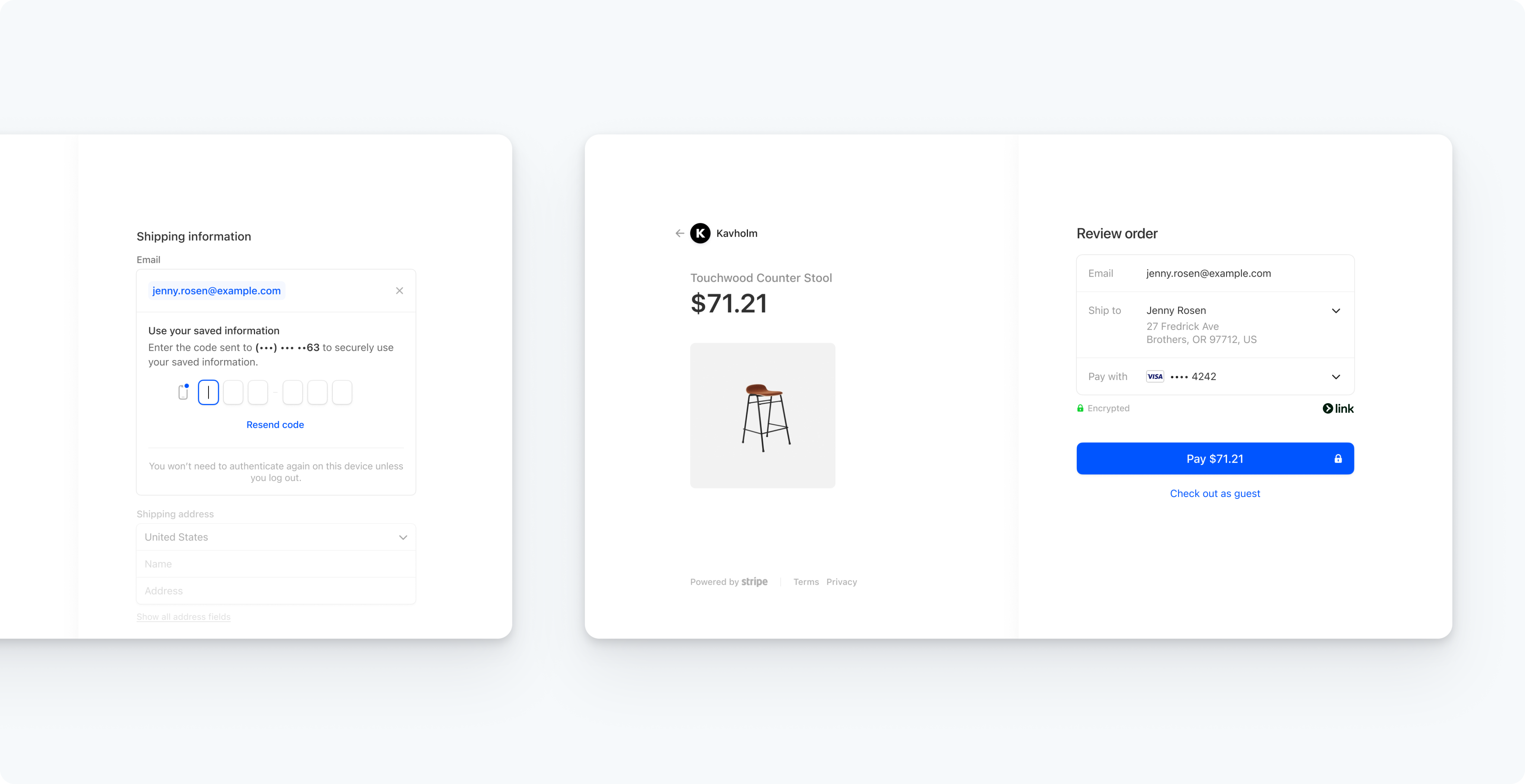 Link shown in Stripe Checkout. Interface details can change as Stripe updates the product.
How Link checkout works
1. The customer starts an eligible checkout
The merchant enables Link and uses a supported Stripe integration. Stripe then evaluates the checkout and decides whether Link is eligible to appear. A customer who does not see Link can continue with the other payment methods offered by that checkout.
2. A new customer chooses whether to enroll
In the Payment Element, Stripe can prefill the Link enrollment fields using information already entered on the checkout page. Prefilling alone does not create a Link account. Stripe says the values are stored only if the customer takes action and consents to sign up. Customers can opt out, and Stripe limits or disables accelerated enrollment where local rules require it.[2]
3. A returning customer authenticates
When authentication is required, Link sends a one-time code by email or SMS. After successful authentication, Stripe can fill eligible saved payment and address information into the checkout. The customer still reviews the available details and confirms the payment.
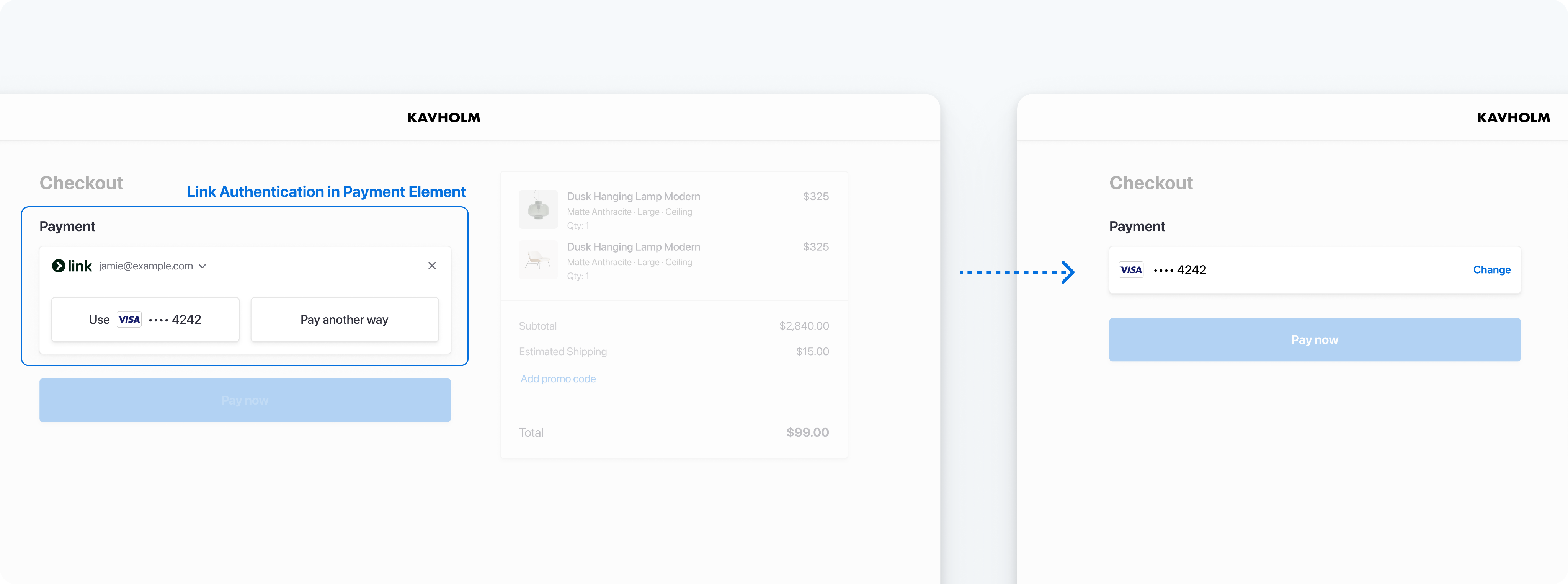 Link authentication or enrollment inside Stripe’s Payment Element.
A Link account can be reused across participating businesses. For example, a customer who saved information during one Stripe Checkout purchase can use it at another eligible Link checkout. Stripe’s Checkout documentation describes this reuse and notes that Link has no additional fee in Checkout, while normal Stripe processing pricing still applies.[3]
When does Link appear?
Turning on Link does not make it visible in every session. Display can vary based on:
- the Stripe account and its country
- the transaction currency and supported payment sources
- the checkout integration and payment method configuration
- the customer’s location, browser, device, and Link status
- Stripe’s eligibility and display decisions for that session
This variability matters during testing. A merchant can have Link enabled correctly and still not see it in a particular production session. Test the intended currencies, devices, browsers, customer locations, and payment flows rather than treating one checkout as proof of universal availability.
Merchant controls for Link
Stripe separates Link availability from the customer enrollment experience. Depending on the integration and account, the main controls include:
- Enable or disable Link: Use Stripe Dashboard → Settings → Payment methods, then select the correct payment method configuration. Stripe notes that a change can take a few minutes to appear.
- Manage the prefill tool: Use Stripe Dashboard → Settings → Payment methods → Link. Stripe currently enables the prefill tool by default when Link is enabled, but merchants can turn it off.
- Check platform settings: A Connect platform and its connected accounts can have different control boundaries, depending on how payments are processed.
- Test safely: Never put real personal or payment information into a sandbox Link account. Stripe warns that sandbox Link accounts are associated with the publishable key and should be treated as publicly available.
Link privacy and security considerations
Link is a customer relationship with Stripe, not merely an autofill feature controlled by the merchant. Stripe says it acts as a data controller for Link data and can process identity, contact, payment, address, transaction, device, and online activity information for purposes described in its privacy policy. Customers can access some information, manage the account, or request account deletion.[4]
Stripe states that it encrypts Link data at rest and in transit and uses one-time codes on new devices and browsers. Stripe is also certified as a PCI Service Provider Level 1. Those protections do not make any checkout risk-free, and they do not remove the merchant’s own responsibilities for website security, privacy notices, access control, fraud monitoring, or PCI scope.
💡 Privacy checkpoint: Explain which customer data your business receives and why. Do not describe Link as anonymous, and do not imply that enabling it transfers every privacy or security obligation to Stripe.
Link with WP Full Pay
WP Full Pay, the Stripe payment plugin covered on this site, lists Stripe Link among its supported wallets and local payment methods. The current documentation says payment methods are enabled or disabled in Stripe, then displayed only when Stripe finds the customer and transaction eligible. Form-level payment method selection is currently limited to inline one-time payment forms.[6]
That means the right setup depends on the WP Full Pay form layout and the Stripe payment method configuration connected to the site. Use the Stripe-supported payment methods guide to check the broader country, currency, form, and eligibility context.
Should you enable Link?
Link can reduce repeated data entry for participating customers, but it should be evaluated as one part of checkout rather than a guaranteed conversion fix. Before enabling it, confirm that the integration is supported, review the customer enrollment experience, update privacy information where necessary, and verify how the business identifies Link transactions.
After enabling Link, compare checkout completion, payment failures, support questions, and the mix of payment methods over a meaningful period. Segment the results by device and market when traffic allows. Avoid attributing every change to Link when pricing, traffic quality, form design, or other payment methods changed at the same time.
Link by Stripe FAQ
Is Link the same as Stripe Payment Links?
No. Link lets eligible customers reuse information saved with Stripe. Payment Links lets a merchant create and share a Stripe-hosted payment page. Link can appear as a payment option inside a Payment Links checkout.
Does Link always appear after it is enabled?
No. Stripe evaluates eligibility for each checkout, and display can vary by account, integration, currency, location, customer, browser, device, and payment method configuration.
Does Link store card details in WordPress?
Link stores eligible saved information with Stripe under the customer’s Link account. A WordPress site using a Stripe checkout should not claim to store the customer’s raw card number simply because Link is available.
Can customers opt out of Link?
Stripe says customers can opt out of accelerated enrollment and that prefilled values are stored only after the customer takes action and consents to create a Link account. Existing Link users can manage or delete their account through Link.
References
- Stripe documentation: Link in different payment integrations
- Stripe documentation: Link in the Payment Element
- Stripe documentation: Link with Checkout
- Link Privacy Center
- Stripe documentation: Payment Links
- Themeisle documentation: Managing payment methods in WP Full Pay