A long list of Stripe payment methods can look reassuring. The real question is narrower: which methods can your business offer to a particular customer, for a particular payment, through the checkout you actually use?
A method can exist in Stripe’s catalog and still be absent at checkout. Your business location, Stripe account capabilities, currency, customer location, payment type, and integration all affect the result.
WP Full Pay is a Themeisle plugin, so it is the WordPress implementation featured here and its smaller documented set is labeled separately. This guide starts with eligibility, then maps Stripe’s broad method families to what WP Full Pay currently supports.
How Stripe payment method eligibility works
Think of availability as a sequence of gates. A payment method appears only when every relevant gate is open:
- Stripe product: The method must work with the Stripe product and mode you use, such as Checkout in payment mode, Payment Links, or an embedded payment form.
- Business and account: Your business country, account capabilities, and any method-specific activation requirements must qualify.
- Payment: The presentment currency, amount, and one-time or recurring use case must be compatible with the method.
- Customer: The customer’s country, device, browser, and saved payment setup can change which options are eligible.
- Integration: Your plugin or custom integration must expose that method and handle its required customer action and payment status.
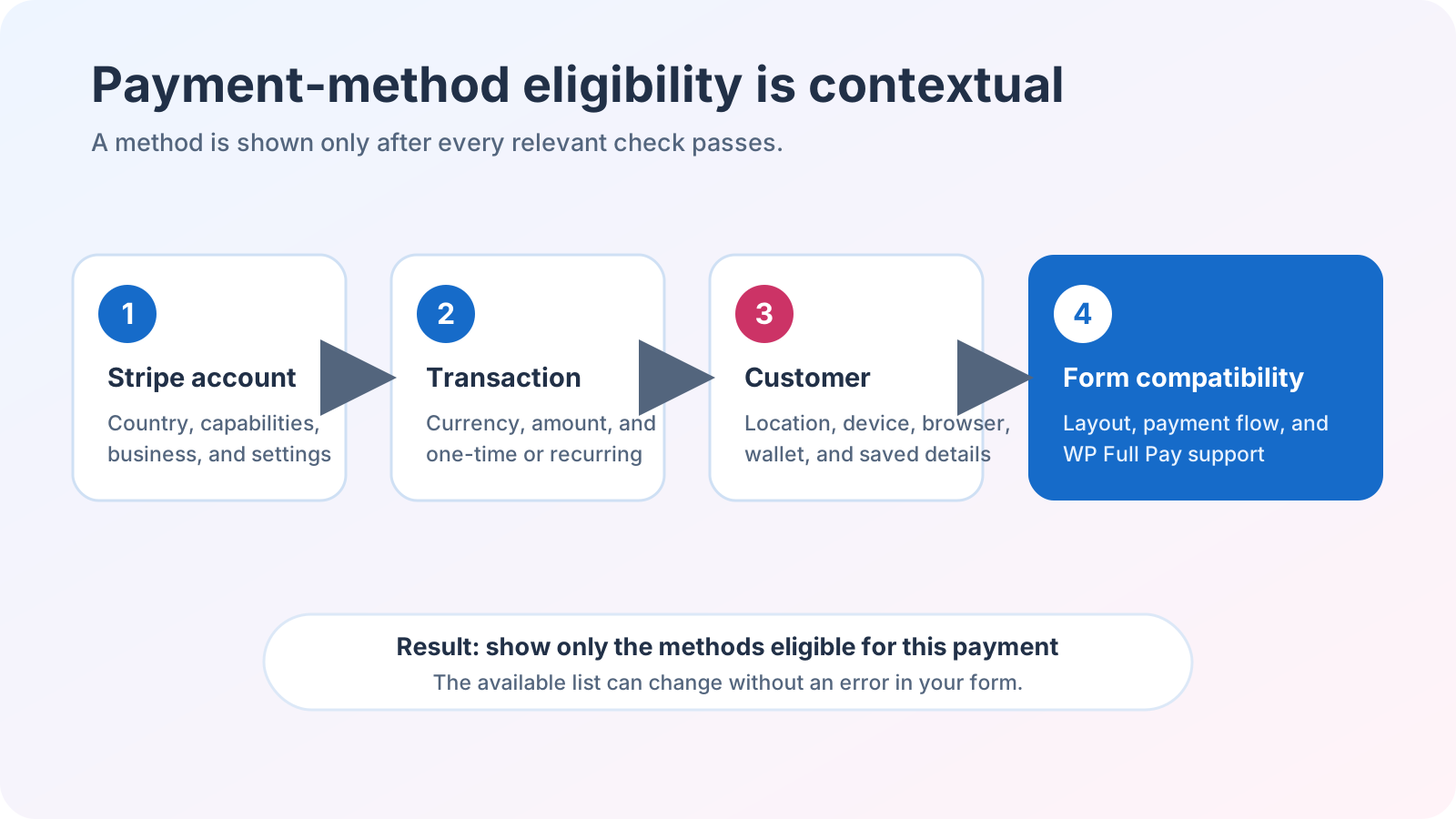 A method reaches checkout only after the account, transaction, customer, and form-compatibility checks all pass.
💡 Practical rule: Never advertise a payment method from a global feature list alone. Verify it with the exact account, currency, customer profile, and checkout flow you plan to use.
Stripe payment method families
Stripe’s current supported-method overview groups payment methods into eight families. The family tells you more about the customer experience and operational work than a brand list does.
| Method family | Typical customer experience | What to check |
|---|
| Cards | Enter card details and complete any required authentication. | Card brand, country, currency, authentication, and future-use support. |
| Bank debits | Authorize a debit from a bank account, often through a mandate. | Mandate rules, delayed confirmation, reuse, and recurring support. |
| Bank redirects | Leave checkout, approve the payment with a bank, then return. | Redirect flow, supported countries and currencies, and one-time or recurring limits. |
| Bank transfers | Push funds using instructions supplied during the payment flow. | Reconciliation, fulfillment timing, and whether the method is single use. |
| Buy now, pay later | Apply with a provider and accept an installment plan. | Customer and business country, amount limits, product eligibility, refunds, and disputes. |
| Real-time payments | Authenticate a direct transfer with a bank or intermediary. | Regional availability, currency, status handling, and product support. |
| Vouchers | Receive a voucher and complete payment online or at a local outlet. | Delayed completion, expiration, refund rules, and fulfillment timing. |
| Wallets | Confirm with a saved card or stored balance. | Device, browser, customer country, domain, and underlying funding source. |
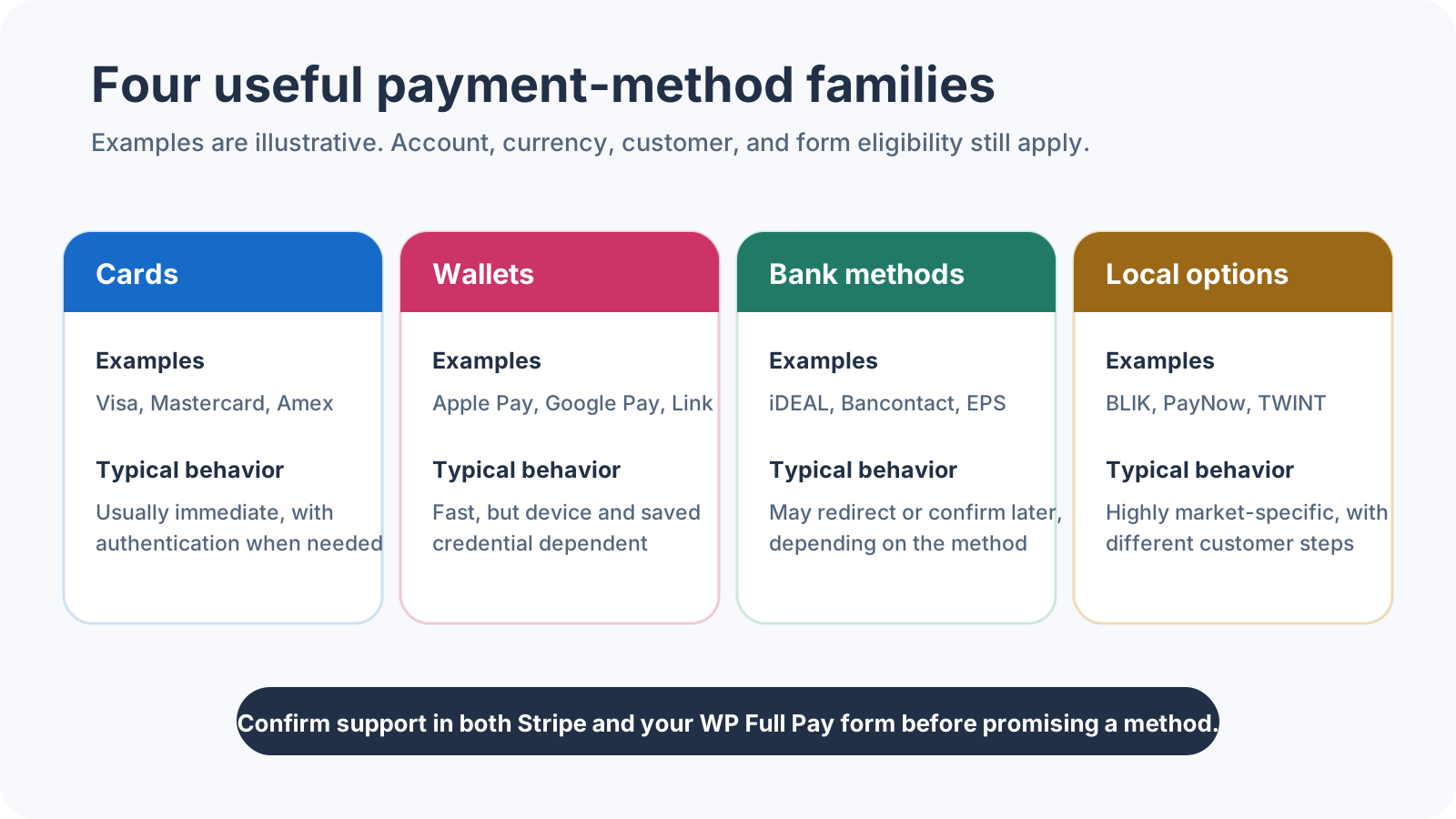 This condensed visual groups common methods by customer action and confirmation behavior; the table above keeps Stripe’s full eight-family taxonomy.
This is a Stripe-wide taxonomy. It does not mean every family or method is available in every Stripe product, account, country, currency, or WordPress plugin.
Payment success is not always known when the customer clicks Pay. Stripe explains that some methods report success immediately, while methods such as ACH debits can remain in a processing state before succeeding or failing.
- Immediate notification: The payment returns a final success or failure state during the flow. Cards are Stripe’s main example, although authentication can still require an extra customer action.
- Delayed notification: The payment can remain in a processing state. The order should stay pending until the integration receives a final success event.
This distinction matters for digital access, downloads, bookings, and physical fulfillment. A completed checkout page is not enough evidence to release the order when the underlying method confirms later. Your integration must handle final status notifications correctly.
Refunds and disputes vary by method
Do not assume card behavior applies to every payment method. Stripe’s refund documentation notes that some methods require extra customer banking information, while method-specific limits and processing times can differ.
Dispute paths differ too. For card disputes, the customer’s bank makes the outcome decision, while Stripe provides notifications and a response workflow. The current Stripe dispute guide explains the card process, but each method’s documentation and applicable payment terms remain the authority for its refund and dispute rules.
- Confirm whether the method supports refunds and whether partial refunds are allowed.
- Check the refund window, processing time, and any customer action required.
- Understand whether disputes apply, who decides them, and what evidence deadlines exist.
- Write fulfillment and cancellation policies that match the method’s actual timing.
Which Stripe payment methods does WP Full Pay support?
This is the boundary broad Stripe lists often blur. The current WP Full Pay payment-method documentation describes 25+ supported methods across cards, wallets, and bank redirects:
| WP Full Pay group | Currently documented examples |
|---|
| Cards | Visa, Mastercard, American Express, Discover, Diners Club, JCB, China UnionPay, Cartes Bancaires, and Meses sin intereses. |
| Wallets and local wallet methods | Alipay, Apple Pay and Google Pay, Cash App Pay, GrabPay, MobilePay, WeChat Pay, Revolut Pay, Amazon Pay, and Stripe Link. |
| Bank redirects | BLIK, Bancontact, EPS, iDEAL, Przelewy24, and TWINT. |
The 25+ wording is a WP Full Pay product claim, not a count of everything Stripe can process. WP Full Pay’s WordPress.org listing labels Affirm, Klarna, Clearpay, pre-authorized debits, ACH Direct Debit, and BECS Direct Debit as coming soon. Treat those as unavailable in WP Full Pay until current official documentation moves them into the supported set.
⚠️ Important: Stripe availability and WP Full Pay support are separate checks. Passing Stripe’s eligibility rules does not make a method available in the plugin.
There is also a form-level limitation. Current WP Full Pay documentation says selecting payment methods per form is available only for inline one-time payment forms. Stripe still decides which of those selected methods an individual customer can see based on location, currency, account, and other parameters.
How to check a method before you promise it
Use a concrete transaction scenario rather than asking whether Stripe supports a method in general.
- Define the business account: Record the Stripe account country and whether the required capability is active.
- Define the payment: Record the currency, amount, one-time or recurring use case, and whether the payment method must be saved.
- Define the customer: Record the customer country plus any device or browser requirement for wallets.
- Check product support: Use Stripe’s country, currency, product, and API support tables for the exact method and integration mode.
- Check the WordPress layer: Confirm that WP Full Pay lists the method and that your form layout supports method selection.
- Test the full lifecycle: Verify display, customer action, success, failure, delayed status if applicable, refund behavior, and the records your team receives.
Do not borrow method counts from another Stripe product
Stripe’s own Checkout documentation describes 125+ local payment methods, while its Payment Links documentation describes 40+. Those are Stripe product counts. They do not mean WP Full Pay supports every one of those methods.
📖 Using Stripe’s no-code link product instead of a WordPress form? See the dedicated Stripe Payment Links guide.
Frequently asked questions
Why is a Stripe payment method not showing at checkout?
At least one eligibility gate is probably closed. Check the account country and capabilities, payment currency and mode, customer location, Stripe product support, and the method settings in your integration. For WP Full Pay, also confirm that the method belongs to its documented supported set and that you are using an eligible form type.
Does enabling a method in Stripe guarantee that customers will see it?
No. Enabling a method makes it available for eligible flows, but Stripe can still filter it for a transaction or customer. Your integration can impose another support boundary.
Are cards, wallets, and Stripe Link the same thing?
No. A wallet can use a card as its funding source, but the customer experience and eligibility checks differ. Stripe Link is a payment method network that lets customers reuse saved payment details across businesses on the Link network.
Does WP Full Pay support every Stripe payment method?
No. Stripe has a broad catalog across multiple products. WP Full Pay currently documents 25+ methods in three groups, with additional methods labeled coming soon on its directory listing.
Can every Stripe payment method be used for subscriptions?
No. Product and mode support varies by method. Some methods are single use, some support future payments, and some redirect methods have subscription restrictions. Check the exact method row for the Stripe product and mode you use.
Which Stripe payment method is best?
There is no universal winner. Start with the methods your customers prefer, then keep only those that pass the account, currency, integration, confirmation, refund, and dispute checks for your business.
Choose by eligibility, not list length
The most useful Stripe payment-method list is not the longest one. It is the list that survives your real account, currency, customer, checkout, and operational requirements.
For WordPress, run the Stripe eligibility check first, then apply WP Full Pay’s documented 25+ method boundary and inline one-time form caveat. Test the complete payment lifecycle before publishing logos or promises on your checkout page. That approach gives customers relevant choices without creating support surprises for your team.