A failed renewal does not always mean a lost customer. Stripe revenue recovery can retry eligible payments, notify the customer, and provide a secure route for updating the payment method. The result depends on how well those parts work together.
The most reliable workflow starts with the failed invoice, identifies whether another attempt can help, gives the customer a clear action, and ends with an explicit subscription state. Blindly repeating a charge is not a recovery strategy.
WP Full Pay is the WordPress implementation featured here. It can provide a customer portal for payment updates and subscription management, while Stripe remains responsible for failed payment retries and failed payment emails.
📖 This guide owns the practical recovery workflow. For the broader strategy behind reminder sequences and customer communication, see the separate Stripe dunning guide.
Start with the failed invoice
Before changing a retry schedule, open the failed invoice or payment in the Stripe Dashboard. Confirm the customer, subscription, amount, payment method, attempt count, decline information, and next scheduled attempt. This separates a recoverable issuer response from a configuration problem or a failure that requires customer action.
Stripe’s current card decline guidance lists common causes such as insufficient funds, incorrect card data, suspected fraud, issuer restrictions, and authentication requirements. The explanation can still be generic because the card issuer does not always share a precise reason.
| What the failure suggests | Best next action | Should another automatic attempt run? |
|---|
| Temporary issuer problem or insufficient funds | Follow the invoice’s advice and the configured Stripe retry policy. | Often, if Stripe marks the payment as retryable. |
| Expired or incorrect payment details | Ask the customer to replace or correct the payment method. | Only after valid details are available. |
| Authentication is required | Send the customer through Stripe’s authentication flow. If recovery relies on Billing’s scheduled retries, also obtain a new payment method. | No. Stripe can keep scheduling retries, but it executes one only after detecting a new payment method. |
| Lost, stolen, revoked, or otherwise non-retryable card | Request a different payment method. | No useful charge can execute until a new method is present. |
| No payment method on the invoice or subscription | Collect and attach an eligible payment method to the correct billing record. | No, because Stripe has nothing to charge. |
Use the current Stripe decline code table for the specific next step. Do not expose a sensitive fraud reason to the customer. Stripe instructs businesses to present several fraud-related codes in the same neutral way as a generic decline.
⚠️ Recovery rule: A hard decline blocks automatic retry execution. The authentication_required code can still send the customer through an authentication flow for the declined payment, but Stripe Billing executes a scheduled retry only after it detects a new payment method.
For automatically collected subscription invoices, go to Billing → Revenue recovery → Retries. Stripe’s current retry documentation recommends Smart Retries, but a custom schedule is also available.
Choose Smart Retries or a custom schedule
- Smart Retries: Stripe chooses attempt timing from dynamic signals and applies the number of retries and maximum duration configured in your policy.
- Custom schedule: You choose up to three retry points, each set a number of days after the previous attempt.
Smart timing does not make every invoice recoverable. Stripe does not execute a retry when no payment method is available or when an issuer returns a hard decline. Its documentation also lists India-issued cards and disconnected Stripe Connect accounts among the conditions that block automatic retries.
Do not copy a generic schedule from another business. Compare the retry window with your billing interval, service access policy, customer support capacity, and the point at which another attempt would create more confusion than value. Test changes in a Stripe sandbox before relying on them in live mode.
Verify which payment method Stripe will retry
A customer can add a valid card and still see the next attempt fail against the old one if a custom integration updates the wrong billing field. Stripe documents a priority order that starts with the subscription’s default payment method, then checks the subscription’s legacy default source, the customer’s invoice default payment method, and the customer’s legacy default source.
If the failed subscription has its own default_payment_method, changing only customer.invoice_settings.default_payment_method does not replace that subscription-level choice. The retry can continue to use the old method. A supported portal flow should manage this relationship, but a custom account page or API integration must update the same level that supplied the failed method.
- Record which payment method and field the failed invoice used.
- Complete the customer’s update through the intended portal or custom flow.
- Reopen the subscription and invoice to confirm the new method is the one Stripe will charge.
Set the final subscription action
A retry policy is incomplete until it defines what happens after the final attempt. Stripe offers three outcomes:
| Final action | Stripe subscription state | Operational consequence to plan |
|---|
| Cancel the subscription | canceled | Stop future subscription billing and align service access with the cancellation policy. |
| Mark the subscription as unpaid | unpaid | Stripe keeps generating invoices as drafts, so decide whether the account stays visible, blocked, or ready for manual recovery. |
| Leave the subscription overdue | past_due | The subscription remains overdue, so access and support rules must not assume it is fully paid. |
Changing retry settings affects future retries. Review invoices already in recovery separately, especially after changing the payment method, retry window, or final action.
Turn on customer emails
A retry can solve a temporary problem, but expired details and authentication failures need the customer. Stripe’s customer email documentation provides separate controls for failed payments, expiring cards, upcoming renewals, and payments that require confirmation.
- Under Billing → Revenue recovery → Emails, enable Send emails when card payments fail for subscription failures.
- Under Email notifications and customer management, review renewal, expiring card, and payment confirmation controls.
- Set the payment update link to the Stripe-hosted portal or a verified subscription management page.
- Apply your Stripe branding, then test the destination, mobile layout, sender identity, and support route.
When failed payment emails are enabled, Stripe says it sends one after each failed attempt. Keep the customer-facing message neutral. State what failed, provide the update action, explain what happens next, and give a support path. Never include full card details or imply that the customer did something wrong.
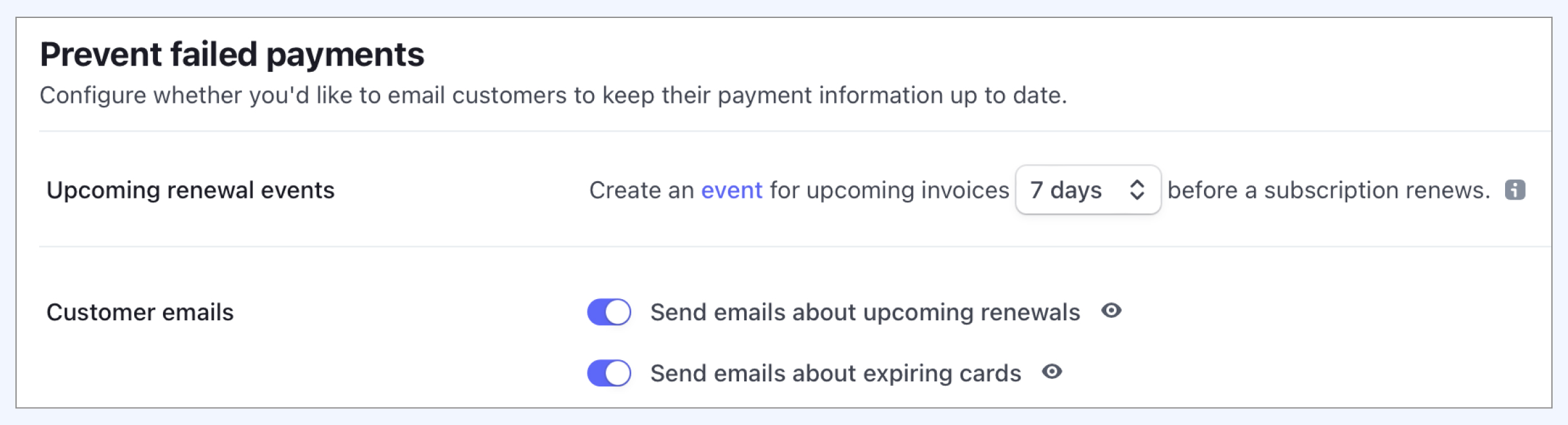 Retained Stripe settings capture showing proactive renewal and card-expiry controls that complement failed payment emails.
The current WP Full Pay email documentation makes an important boundary explicit: failed payment, upcoming renewal, and expiring card notices are Stripe notifications. WP Full Pay can send other transactional emails, but it does not replace Stripe’s failed payment email control.
Provide a secure payment update path
A failed payment email is useful only if its destination works. The Stripe-hosted Customer Portal can let customers update payment methods, view invoices, and manage subscriptions according to the features enabled for the portal.
For a WordPress-based portal, current WP Full Pay portal documentation supports two authentication patterns:
- Create a dedicated WordPress page for the portal.
- Use
[fullstripe_customer_portal] when customers should authenticate with a one-time code sent to their email address.
- Use
[fullstripe_customer_portal authentication="Wordpress"] when every customer has a matching WordPress user and should authenticate through that account.
- Open Full Pay → Settings → Customer portal and choose whether the built-in portal or Stripe-hosted portal should handle customer actions.
- Exclude the built-in portal page from page caching, then test login, payment method update, invoice access, cancellation behavior, and the return path.
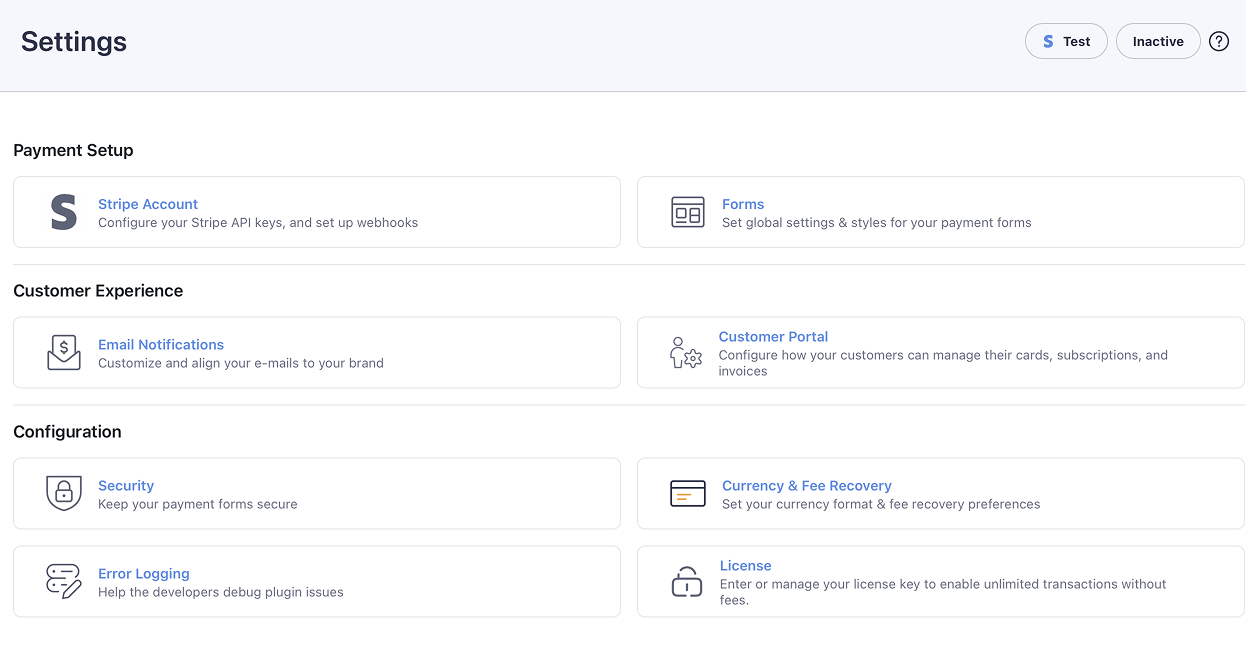 The retained WP Full Pay settings overview keeps Email Notifications and Customer Portal as separate customer-experience areas.
The current WP Full Pay settings reference confirms that enabling the Stripe-hosted portal hands customer-facing controls to Stripe. The built-in portal can show subscriptions and invoices, while the exact customer actions depend on the options you enable.
💡 Test the recovery path with a real customer journey in sandbox mode: receive the failure notice, open the portal, update the intended payment method, and confirm that the next attempt uses it.
📖 Building the subscription flow first? Read how to accept recurring payments in WordPress. For consent and future-use details, see the guide to saving customer card details with Stripe.
Test the complete recovery handoff
A settings screenshot cannot prove the workflow. Use a Stripe sandbox and a test customer to exercise the path from failure to recovery before enabling it for live subscriptions.
- Create or identify a test subscription and trigger a documented test failure.
- Confirm the failed invoice, decline information, attempt count, and next action in Stripe.
- In a Stripe sandbox, receive the expected notification at an address on a verified email domain or belonging to an active team member, then open its exact destination.
- Authenticate to the portal, replace the payment method, and verify the subscription points to the new method.
- Complete the next attempt, then confirm the invoice, subscription state, WordPress access, receipt, and support history all agree.
Archive the test customer, failure type, settings, timestamps, expected result, and observed result. Repeat the test after changing portal authentication, caching, retry logic, or access rules.
Treat automatic card updates as a safety net
Stripe works with card networks and attempts to update saved card details when an issuer replaces a card. This can prevent some expiry or replacement failures before the customer needs to act.
Coverage is not absolute. Stripe’s automatic card update documentation says the issuer must participate, support varies by country, and it is not possible to identify in advance which cards support updates. A customer might also change banks, close the account, or need authentication.
Keep retry, email, and portal controls active even when automatic updates are available. Treat an updated card as a helpful event, not as proof that the next invoice will succeed.
Measure recovery without misreading the Dashboard
The Stripe revenue recovery overview tracks failed payment volume, failure rate, recovered payment volume, recovery rate, recovery method, and decline reason for recurring subscriptions.
| Metric | Question it answers | Interpretation guardrail |
|---|
| Failed payments | How much recurring payment volume failed on the first attempt? | Separate volume from customer count so one large invoice does not hide a widespread issue. |
| Failure rate | What share of recurring payment volume failed initially? | Compare similar billing cycles, markets, and payment method mixes. |
| Recovery rate | What share of failed recurring volume was later recovered? | Do not judge recent periods before the configured retry window has closed. |
| Recovered by method | Did retries, Stripe emails, or another action recover the payment? | Use this to improve the weakest handoff rather than claiming one tactic caused every recovery. |
| Decline reasons | Which failure categories account for the most failed volume? | Prioritize the largest actionable category and preserve neutral customer messaging. |
Stripe notes two important boundaries. Recovery analytics covers recurring subscription payments, and it excludes the first invoice payment following a trial. Recent months can also look artificially weak while invoices are still in recovery.
Review a closed cohort after its retry window ends. Pair Stripe’s volume metrics with customer count, time to recovery, support contacts, portal completion, and account access outcomes. This shows whether the workflow recovered revenue without creating unnecessary customer friction.
Know when to stop retrying
More attempts are not automatically better. Card networks limit repeated attempts, hard declines require a changed payment method, and a customer who has canceled or disputed the charge should not stay in an automated collection loop.
- Stop and request new details when Stripe says the payment cannot be retried without a new method.
- Stop the automated sequence when the customer has canceled, revoked authorization, or raised a billing dispute that needs review.
- Apply the configured final action when the retry window closes without recovery.
- Escalate manually only when the customer value and support context justify it, and keep the message factual and respectful.
The stopping rule belongs in your subscription terms, customer support playbook, and access-control logic. The Stripe state, WordPress access state, and customer-facing explanation should agree.
Failed recurring payment recovery checklist
- Inspect the failed invoice, decline information, payment method, attempt count, and next attempt.
- Separate retryable failures from those that need customer action or a new payment method.
- Configure Smart Retries or a deliberate custom schedule in Stripe Billing.
- Choose the subscription state that follows the final failed attempt.
- Enable Stripe failed payment emails and verify every update link.
- Test the Stripe-hosted or WP Full Pay portal from the customer’s perspective.
- Keep automatic card updates in perspective because issuer and country coverage varies.
- Measure a closed recovery cohort and review failure reasons regularly.
- Stop retrying when the failure, customer decision, or configured window says to stop.
The best failed payment system is predictable. Each invoice has a diagnosis, each customer has a safe action, each retry follows a declared policy, and every unrecovered subscription reaches a deliberate final state.